Category
AI Strategy Plan Template: The Nine Sections
Last updated: June 2026
By David Brennan · Arkeo AI · Building and Deploying Custom AI agents since 2023
The most common AI strategy plan template is a 40-slide deck with a vision statement on slide one and a vendor evaluation on slide 38. That template does not produce deployed AI. It produces a second deck.
The template that produces deployed AI fits on two pages. It has nine sections, each requiring a specific written answer before the build starts. Here is the template, with the exact content each section requires and why it cannot be skipped.
Quick Answer
The nine sections: Current-state summary. Workflow shortlist. Data-path decision. Owner registry. Baseline methodology. Kill criteria. Build brief. Governance cadence. 30/90/12-month milestones. Each section is one to three sentences. The document is two pages.
What it replaces: A 40-slide strategy deck. A six-week consulting engagement. A committee-produced vision document that defers all three binding decisions.
Next step: The free AI Assessment populates sections one through four in a single working session, grounded in your actual workflows.
The free AI Assessment runs the current-state map, produces the workflow shortlist, resolves the data-path question, and names the owners. You leave with the first four sections complete and the build team ready to start.
Book Your Free AI Assessment →Why the standard AI strategy template does not work
Most AI strategy templates are built around comprehensiveness rather than decisions. They include sections for market context, competitive landscape, technology evaluation, use case inventories, and multi-year roadmaps. None of those sections answer the questions a build team needs to start: which workflow ships first, who owns it, where does the data live, what does success look like at 90 days, and what triggers a pause.
The Deloitte State of Generative AI study found more than two-thirds of organizations expecting 30 percent or fewer of their AI experiments to scale. BCG found 74 percent struggling to capture value from AI. The common thread is not a shortage of strategy documents. It is a shortage of templates that force the binding decisions before the build starts.
The nine-section template here is built around decisions, not documentation. Each section produces a specific written answer. When all nine sections are complete, a build team can start without a clarifying conversation.
The AI strategy framework guide covers the methodology behind each component. The core AI strategy article covers the three binding decisions in detail. This article is the template itself.
The operator test: Can you fill in all nine sections right now, in writing, without a committee discussion? If any section requires a meeting to answer, that meeting is the bottleneck, not the template.
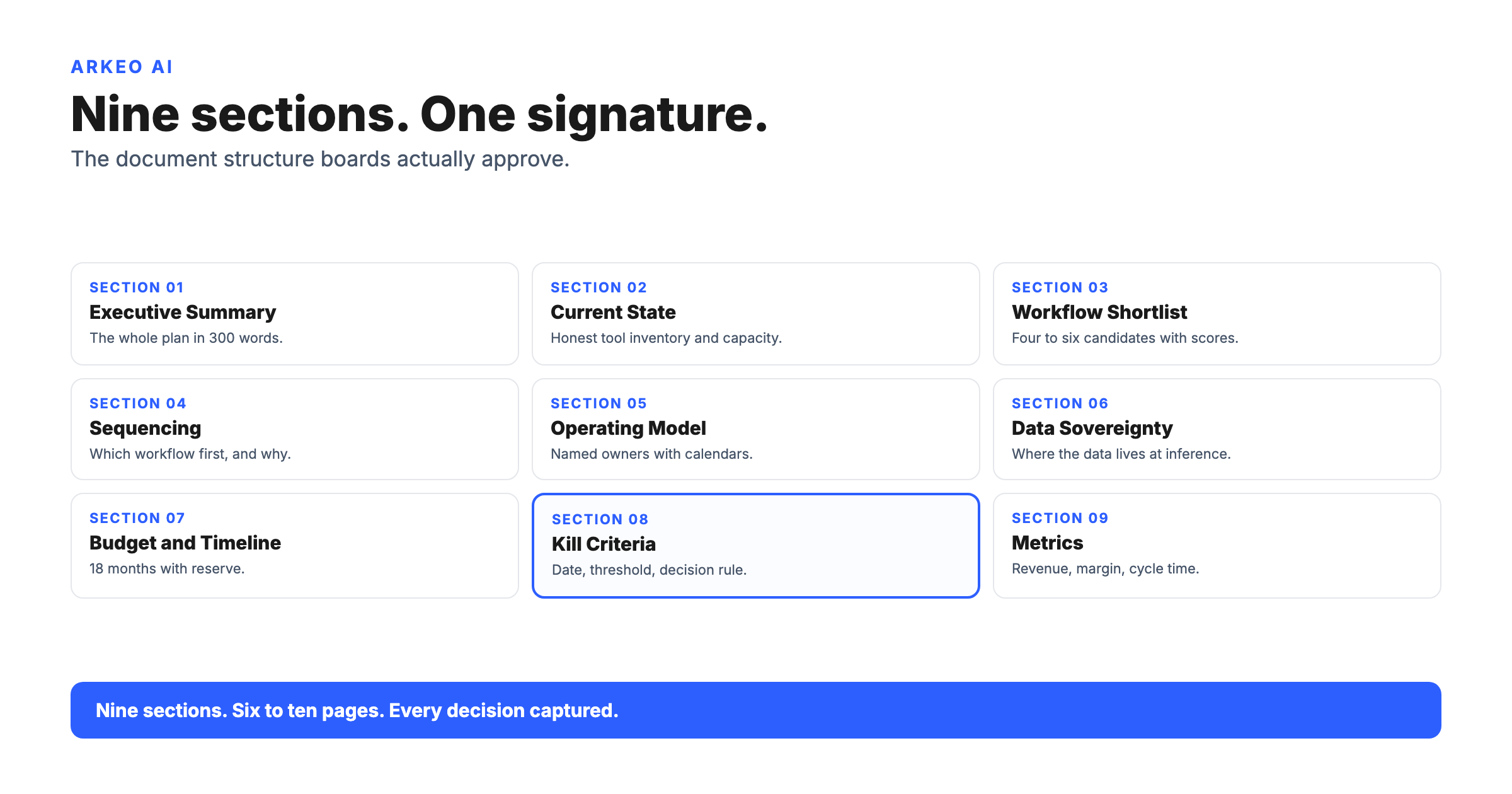
The AI strategy plan template: nine sections
TEMPLATE OVERVIEW
THE TEMPLATE
Nine sections. Two pages. All nine in writing before the build starts.
SECTION 1
Current-state summary
What goes here: Two sentences. The first names the three highest-volume, highest-pain workflows in the business. The second states whether the data those workflows run on is cloud-safe or requires private deployment.
Example: “The three highest-volume AI candidates are contract clause flagging (400 per week), intake form summarization (200 per week), and invoice matching (150 per week). Contract data is subject to NDA restrictions and requires private deployment; the other two are cloud-safe.”
SECTION 2
Workflow shortlist
What goes here: Three workflow candidates in priority order. For each: the workflow name, the volume score, the pain score, and the data-sovereignty status. The top candidate is the one the business will build first.
Example: “1. Intake form summarization (volume: high, pain: high, data: cloud-safe). 2. Invoice matching (volume: medium, pain: high, data: cloud-safe). 3. Contract clause flagging (volume: high, pain: high, data: private required).”
SECTION 3
Data-path decision
What goes here: One sentence stating the data-path decision for the first workflow, plus the name and title of the person who signed off. This must be a written, approved decision, not a verbal agreement.
Example: “The intake form summarization workflow is approved for cloud deployment. Signed off by [General Counsel name] on [date].”
SECTION 4
Owner registry
What goes here: Two names. The executive owner (budget and escalation authority) and the operational owner (runs the workflow on Monday morning). Both names, both job titles, both in writing before the build starts.
Example: “Executive owner: [COO name, COO]. Operational owner: [Operations Lead name, Head of Operations]. Escalation path: operational owner contacts executive owner within 24 hours of override rate exceeding 15 percent.”
SECTION 5
Baseline methodology
What goes here: How you are measuring this workflow right now, before AI touches it. Three numbers: time per unit (minutes per task), error rate (percent of tasks requiring human correction), and cost per unit (fully loaded staff cost). These become the comparison point at Day 90.
Why this cannot be skipped: A deployment without a baseline cannot demonstrate ROI. IBM research found 54 percent of AI projects stall after proof of concept, often because the business cannot show the board a before/after comparison. A synthetic baseline added after deployment does not hold up to a CFO review.
Example: “Intake form summarization baseline: 14 minutes per form (staff time), 11 percent error rate (forms requiring re-review), $4.20 per form (fully loaded). Measured from Q1 2026 operations data, 847 forms sample.”
SECTION 6
Kill criteria
What goes here: The override rate threshold that pauses the deployment and triggers a human review. One number. Named before the build starts, not after the first month of operation. The kill criteria is not a performance target. It is a circuit breaker.
Typical range: 15 to 20 percent override rate triggers a pause for document-processing workflows. Higher-stakes workflows (financial or legal output) typically set the threshold at 10 percent.
Example: “Kill criteria: if the weekly override rate exceeds 18 percent for two consecutive weeks, the operational owner pauses the workflow and initiates a review with the executive owner within 48 hours. The workflow does not resume until the override rate root cause is identified and corrected.”
SECTION 7
Build brief
What goes here: One paragraph. The workflow name, what the agent does (one sentence), the input source (where the data comes from), the output format (what the agent produces and where it goes), and the name of the operational owner who accepts the output. This is the document the engineer builds from.
Why this cannot be skipped: A build that starts from a verbal description produces an agent that matches the verbal description, not the actual workflow. The build brief forces the precision that prevents the most common mid-build failure: discovering the data source, output format, or approval step is different from what was assumed at kickoff.
Example: “Intake form summarization agent: reads incoming intake PDF forms from the /intake/pending folder, extracts the ten required fields, and writes a structured summary to the /intake/reviewed queue for operations lead review. Output owner: [Operations Lead name].”
SECTION 8
Governance cadence
What goes here: Three lines. The operational review cadence (who reviews the override rate, how often). The executive review cadence (when the executive owner sees a summary). The escalation trigger (what specific condition moves the review from operational to executive level).
Why this cannot be skipped: A deployment without a governance cadence runs until something goes wrong with no one watching. The governance cadence is the mechanism that catches override rate drift before it becomes a business problem.
Example: “Operational review: [Operations Lead] reviews weekly override rate every Monday. Executive review: [COO] receives monthly summary on the first of each month. Escalation trigger: override rate above 18 percent for two consecutive weeks, or any single-week spike above 25 percent.”
SECTION 9
30/90/12-month milestones
What goes here: Three milestone statements. Day 30: the workflow brief is complete and the build sprint has started. Day 90: the first workflow is in production with override rate monitored. Month 12: three workflows in production, second workflow entering build phase.
Why this cannot be skipped: A strategy without dates is a strategy with no accountability. The three milestones are gate questions. If Day 30 passes and the build brief is not complete, the constraint is named: which of sections one through eight is still blank, and why.
Example: “Day 30: intake form summarization brief complete, data path approved, owner named, build sprint started. Day 90: agent in production with weekly override rate under 12 percent for four consecutive weeks. Month 12: three workflows in production, invoice matching entering build phase.”
If any section is blank, the template is not complete. A blank section is the strategy gap that stalls the build.
Which sections stall most often, and why
WHERE STRATEGIES STALL
Legal sign-off deferred or legal team not included in assessment phase
Operational owner not named because the decision feels like an HR question
Baseline not measured before build; estimated numbers added retroactively
Override rate threshold never agreed on; no mechanism to pause a failing workflow
Review cadence undefined; deployment runs without anyone watching override rate
Section three stalls more often than any other. The data-path decision requires a legal or security sign-off, and most assessment processes do not include the legal team in the room. The fix is to include legal in the current-state map session, not as a separate approval chain after the workflow is selected. A legal sign-off that takes two weeks delays the build by two weeks. A legal sign-off that happens in the assessment session delays nothing.
Section four stalls because naming the operational owner feels like an organizational decision rather than a strategy decision. It is both. The operational owner is the person who will review the override rate every Monday and make the call to pause or continue. If that person is not named before the build starts, the governance structure has a gap that does not become visible until the first month of operation.
Sections five, six, and eight stall because they feel like operational details rather than strategy decisions. They are strategy decisions. A deployment without a baseline cannot demonstrate ROI. A deployment without kill criteria cannot be paused safely. A deployment without a governance cadence is a deployment that runs on hope.
How to fill in the template without a six-week engagement
Sections one through four come from the current-state map: a structured one-hour conversation with the three or four people who run the most labor-intensive processes in the business, plus the legal or security lead for section three. Total time: one working session, two to three hours with the right people in the room.
Section five takes one hour after the current-state map. Pull three months of operations data for the top workflow candidate. Count the time per unit, the error rate, and the staff cost per unit. If the operations data is not clean enough to produce these numbers in an hour, that is a data readiness problem to resolve before the build starts.
Sections six and eight follow directly from section four. Once the owner registry is named, the kill criteria conversation is a ten-minute discussion: at what override rate does the operational owner call the executive owner? The governance cadence conversation is another ten minutes: how often does the operational owner report, and to whom?
Section seven, the build brief, requires the engineer who will build the agent to write one paragraph describing the workflow from input to output. If the engineer cannot write this paragraph from the information produced by sections one through six, the sections are not complete enough to start the build.
Section nine follows from the 90-day implementation plan: day 30 is the end of the assessment phase, day 90 is the end of the deploy phase, and month 12 is the output of the 12-month roadmap.
The operator test: Take the template above and set a deadline of five business days to fill in all nine sections with your team. If you cannot complete all nine in five days, name the blank section and the specific reason it is blank. That reason is the strategy problem to solve.
The free AI Assessment runs the current-state map, builds the workflow shortlist, resolves the data-path question, and names the owners. You leave with the first four sections of the template complete and the build team ready to start on sections five through nine.
Book Your Free AI Assessment →Frequently Asked Questions
The free AI Assessment fills in the current-state summary, workflow shortlist, data-path decision, and owner registry in one working session. You walk out with a strategy template the build team can act on immediately.
Book Your Free AI Assessment →