Category
AI in Construction Scheduling: Where It Helps

Last updated: May 2026
Your master schedule is only as good as the field updates feeding it, and most teams find that out the hard way when a conflict surfaces two weeks too late. Picture a 14-floor commercial fit-out where the mechanical crew and the drywall crew both get pointed at the same floor in the same week, a long-lead air handler lands before its housekeeping pad is poured, and the planner spends Monday rebuilding logic in Primavera P6 instead of looking ahead. The recurring lesson from three years of deploying AI agents inside live operations is plain: the tool almost never fails on the math, it fails on the data nobody updated. That operator vantage shapes the honest answer here. AI helps construction scheduling as decision support, and the question worth answering first is whether scheduling is even the right place for you to start.
Quick Answer
• What it is: decision support for scheduling, surfacing conflicts, comparing scenarios, handling exceptions, and speeding coordination, with a planner deciding, not an autopilot rewriting the program.
• What it cannot do: fix stale schedules, missing constraints, or no clear owner. Bad inputs just produce faster bad plans.
• Timeline: a narrow conflict-surfacing pilot on one project is typically live in 30 to 90 days.
• Why it matters: labor and coordination pressure squeezes margins, and AI relieves it inside the scheduling work your team already does.
• Where to start: map your bottlenecks first with the free AI Assessment, then pilot one workflow before expanding.
Where Does AI Actually Help in Construction Scheduling?
Artificial intelligence in construction scheduling is decision support that surfaces conflicts, compares scenarios, handles exceptions, and speeds coordination, while a human planner still makes the call. It is not an autopilot that rewrites your program overnight, and the firms that treat it that way are the ones that get burned. The useful version sits inside four jobs your planners already do, and does them faster and earlier.
The first is conflict surfacing. A model that reads your schedule, your constraints, and your latest field updates can flag trade-stacking, resource collisions, and out-of-sequence work before they reach the field. The schedule itself usually still lives where it always has, in Primavera P6 or Microsoft Project, with field reality flowing through a platform like Procore, and the AI layer reads across those rather than replacing them. Instead of discovering a clash during the weekly look-ahead meeting, the planner sees a ranked list of likely conflicts on Monday morning and spends the meeting deciding what to do about them.
The second is scenario comparison. When a delivery slips or a crew falls sick, someone has to ask what the knock-on effects are. AI can run several what-if sequences against the same constraints and show the schedule and cost trade-offs side by side. The planner still chooses the path, but the grunt work of modeling each option shrinks from hours to minutes.
The third is exception handling. Most schedule slippage is not dramatic. It is a steady drip of small variances that nobody has time to chase. An agent can watch progress data, compare it to plan, and route the exceptions that actually matter to the person who owns them, so the look-ahead stays clean.
The fourth is coordination support. A large share of a scheduler's week is spent chasing confirmations, reconciling subcontractor commitments, and translating field reality back into the master schedule. AI can draft those follow-ups, summarize where commitments stand, and surface the gaps, so the planner spends time judging the schedule rather than assembling it. The labor pressure behind all of this is real: worker shortages caused project delays for 54% of firms in the AGC's 2024 workforce survey, which is why anything that gives planners back time has a direct line to the margin.
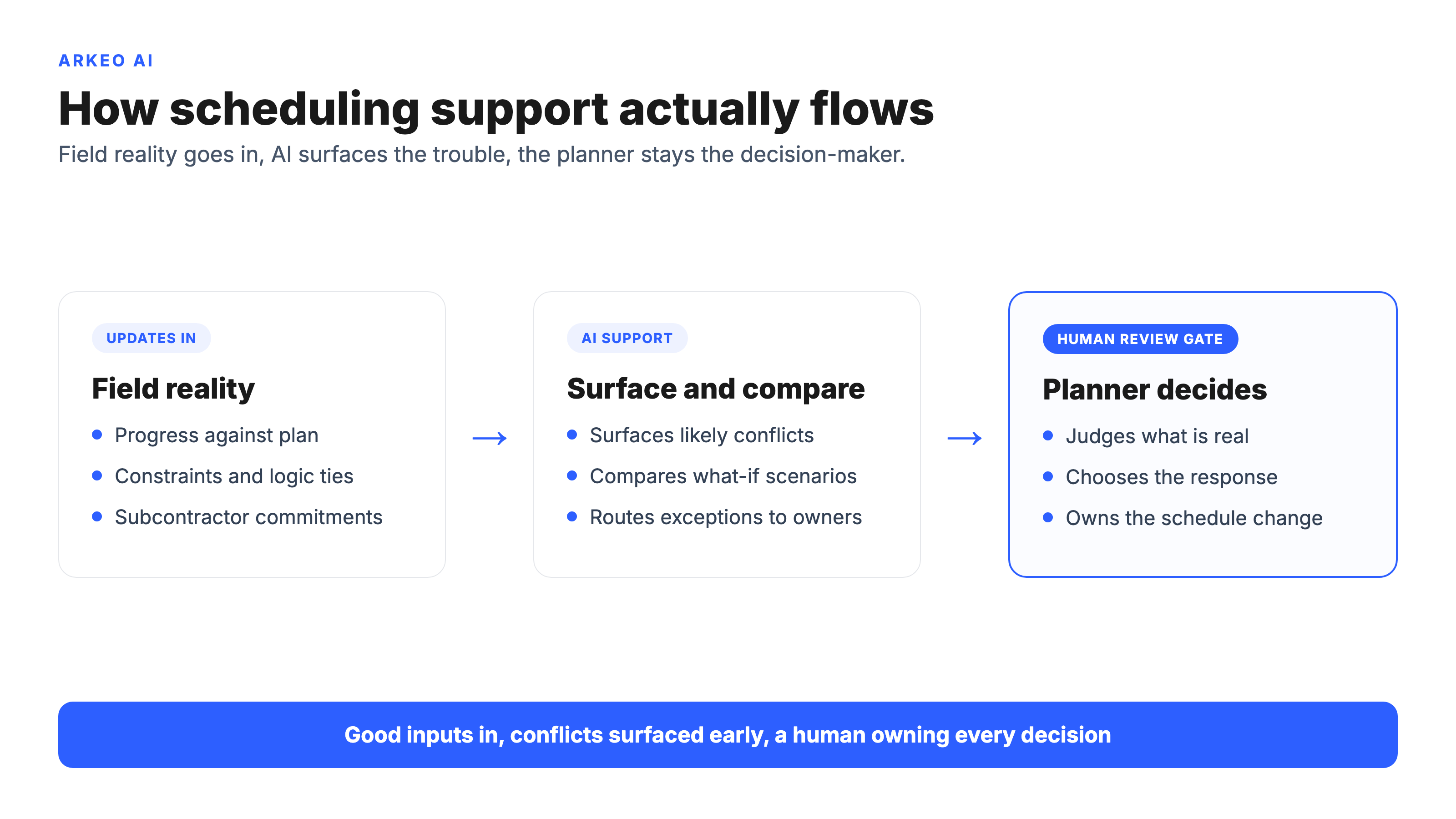
None of these four jobs is glamorous, and that is the point. The wins in scheduling are not in a robot that runs the project. They are in giving an experienced planner earlier sight of trouble and faster ways to test responses, so the human judgment that actually protects the program gets pointed at the right problems.
What Can AI Not Fix in Scheduling by Itself?
Here is the blunt truth a software vendor will not put in a brochure: bad inputs just produce faster bad plans. AI does not have an opinion about whether your schedule reflects reality. It works with what it is given, and if the inputs are wrong, it will surface confident, well-formatted conclusions that are wrong, and it will do it faster than your old process did.
There are three failure modes it cannot solve on its own. The first is bad inputs. If durations are guesses, logic ties are sloppy, and constraints live in someone's head instead of the schedule, no model can recover the truth that was never captured. The second is a stale schedule. A program that has not been updated against actual field progress is fiction, and AI applied to fiction produces faster fiction. The third is missing ownership. A surfaced conflict that nobody is accountable for closing is just a more efficient way to ignore a problem.
This is also where a common false belief needs challenging. Many teams assume that adopting an AI scheduling tool will impose the discipline they have been missing, that the software will somehow force timely updates and clean logic into existence. It will not. The discipline has to come first, and the control over inputs has to be deliberate, not assumed. That gap is industry-wide: IBM found that 63% of organizations had no AI governance policy or were still developing one in its 2025 study, which is another way of saying most teams point AI at data they have not yet decided how to control. AI rewards a well-run scheduling process and it ruthlessly exposes a poorly-run one. The tool is a multiplier, and a multiplier works in both directions.
Consider the pattern beneath all of this. Construction productivity has been broadly flat for a long time, and a big part of why is that project data stays fragmented across systems, inboxes, and people's memories. Pointing AI at fragmented, untrusted data does not fix the fragmentation. It just makes the consequences of it arrive sooner.
See whether scheduling is your right first workflow
The free AI Assessment maps your project bottlenecks and ranks the scheduling and coordination work where AI returns the most for the least effort, so you start narrow instead of automating the wrong thing.
Book Your Free AI Assessment →
What Data and Process Discipline Does a Scheduling Rollout Need?
The good news is that the discipline AI requires is the same discipline that makes any schedule trustworthy, so the prep work is not wasted even if you never deploy a model. Three things have to be in place before scheduling support earns its keep.
First, timely updates. The schedule has to be refreshed against real field progress on a regular, enforced cadence, not whenever someone gets around to it. AI watching a schedule that updates weekly can do useful work. AI watching a schedule that updates whenever there is a crisis cannot.
Second, clear constraints. Long-lead items, inspection holds, crew availability, weather windows, and site access rules have to live in the schedule as explicit logic, not as tribal knowledge. A model can only reason about constraints it can see. Anything held informally is invisible to it, and invisible constraints are exactly where conflicts hide.
Third, owner accountability. Every surfaced conflict needs a named person responsible for resolving it and a place that resolution is recorded. Without ownership, surfacing problems faster just produces a longer list of unaddressed problems. The handoff from AI to human is the most important part of the whole system, and it has to be designed, not assumed.
There is a reason Arkeo runs its own agents, including its own scheduling and coordination workflows, on private, on-premise infrastructure rather than handing the data to a public cloud. Arkeo uses what it sells, and the discipline above is exactly what that posture forces: when the inputs sit on infrastructure you control, you are accountable for keeping them current and correct, and there is no vendor cloud to blame when a constraint never got entered. Control over the inputs and discipline about them tend to travel together.
To make the input problem concrete, picture a scheduler on a 14-floor commercial fit-out, juggling three active floors and a tight occupancy date. The mechanical subcontractor confirms a revised tie-in date by text on a Thursday afternoon, but that confirmation never makes it into the master schedule, so the look-ahead still shows the old date. A scheduling agent reading that master schedule would never flag the conflict, because as far as the data is concerned there is no conflict. The crew gets mobilized to the old date, finds the tie-in is not ready, and a half-day of skilled labor stands idle on the floor. The miss is not an AI failure. It is an input-discipline failure, and it shows precisely why timely, captured updates matter more than the cleverness of the tool. This example is representative rather than drawn from a specific project, but the pattern is the common one: get the text into the system on a reliable path and the agent earns its place, leave it in someone's phone and no amount of intelligence will save the plan.
How Should You Pilot AI in Scheduling Workflows?
The right way to pilot scheduling support is narrow and measurable. The wrong way is to try to model the entire program on day one. A sensible first pilot is conflict surfacing on a single project, run alongside the existing process so the planner can compare what the agent flags against what the team would have caught anyway.
Three rules keep a pilot honest. Pick a narrow use case so the value is easy to see and the failure modes are contained. Keep human review in the loop so the planner stays the decision-maker and trust is built on real outputs, not promises. Measure adoption, because a tool the planners route around is a tool that failed, regardless of how good its conflict detection looks in a demo.
On cost and timeline, a narrow scheduling-support pilot, such as conflict surfacing on one project, is typically live within a single quarter. The honest caveat is that the value depends on disciplined, timely inputs, not on the tool. A team with a well-maintained schedule will see results inside that window. A team whose schedule is stale will spend the first stretch fixing inputs, and that work is the actual prerequisite, not an optional extra. This decision-support framing is the same one Arkeo applies across AI in construction generally, and scheduling is one workflow among several where it holds.
The reason to start with one workflow and one owner is the same reason the broader uptake is accelerating without delivering value evenly: adoption has outrun discipline. By Stanford HAI's account, 78% of organizations used AI in 2024, up from 55% the year before, and the delivery pressure pushing construction firms toward these tools is documented across the sector, including in Deloitte's 2025 engineering and construction outlook. The firms that get value are the ones that pair adoption with the input discipline above, not the ones that move fastest.
When Should Scheduling Be the First Workflow You Improve?
Scheduling is the right first workflow when three conditions hold. Your schedule is already maintained on a real cadence, so the inputs can be trusted. Coordination and conflict resolution are a genuine bottleneck eating planner time, so there is real value to recover. And there is a named owner who will act on what the agent surfaces, so problems get closed rather than logged.
If those conditions do not hold, scheduling is usually not where to start. A team without a maintained schedule should fix that discipline first. A team whose real bottleneck is document retrieval or RFI triage should automate that instead, because the value is closer and the input discipline is easier. The point of choosing well is that the first win sets the tone for everything after it, and a first project that exposes input problems instead of delivering value sours the whole effort. This is also why scheduling rarely lives in isolation. It connects directly to broader AI in construction project management and to the day-to-day mechanics of AI in construction management, and the sequencing of which workflow to tackle first should be a deliberate decision rather than an accident of whichever tool a vendor demoed last.
The pain-point table below is the fastest way to read where scheduling support fits. The pattern is consistent: AI fits best where the work is repetitive, data-driven, and easy to verify, and fits worst where it depends on judgment, relationships, or data that simply is not captured.
| Scheduling pain point | AI-fit level | What it needs to work |
|---|---|---|
| Conflicts surface too late | High fit | Constraints in the schedule and timely progress updates |
| Slow what-if scenario modeling | High fit | A clean baseline schedule and explicit logic ties |
| Small variances go unchased | Strong fit | A named owner for each exception that is routed |
| Coordination follow-ups eat planner time | Strong fit | Commitments captured in a system, not by text or memory |
| Source schedule is unreliable | Low fit | Fix update cadence and ownership before adding AI |
| Sequencing depends on field relationships | Low fit | Human judgment stays the owner; AI assists at the edges |
Read the table as a map of where to point your first effort. The high-fit and strong-fit rows are candidate pilots once the input discipline is in place. The low-fit rows are not arguments against AI, they are reminders that the prerequisite is a trustworthy process, and that some parts of scheduling will always belong to the planner.
Turn this into a plan for your next project
In 60 minutes the free AI Assessment gives you a prioritized list of scheduling and coordination workflows worth piloting and a phased path to get there, with no obligation to buy a build after.
Book Your Free AI Assessment →





