Category
AI in Construction Safety: A Practical Guide
Last updated: May 2026
Your safety program runs on people, paper, and follow-through, and any one of those breaking is how incidents slip through. Observation cards get logged and forgotten, near-miss reports sit unrouted, and the toolbox-talk topic that mattered most last week never makes it to the crew that needs it this week. Arkeo AI was founded in 2023 on 25 years of running real businesses, and the company has spent three years deploying AI agents inside live operations, including its own through the Arkeo Operating System (AOS), which it runs on its own on-premise, private-AI infrastructure rather than handing operational data to a public cloud. Arkeo uses what it sells, so the view here is operational, not theoretical: AI can carry a real share of the administrative weight in safety, but it does not, and should not, replace the people accountable for it.
Quick Answer
• What it is: AI as a workflow-support layer for safety, capturing observations, categorizing hazards, routing follow-up, and reinforcing training, with a human reviewing the output.
• Where it helps: the high-volume, low-judgment administrative work that buries safety leads and lets reports go stale.
• Where it stops: AI should never be the sole safeguard for critical, context-sensitive, or high-risk decisions; those keep a named human owner.
• Timeline: a low-regret first workflow, such as an observation router, is typically live in 30 to 90 days, with a human reviewer kept in place.
• Where to start: map your bottlenecks first with the free AI Assessment, then decide whether safety is your right first workflow.
Construction is a high-stakes setting for this conversation. The US Bureau of Labor Statistics recorded about 1,075 construction fatalities in 2023, roughly a fifth of all US worker deaths that year, with the so-called Fatal Four causes accounting for about half of them. The federal safety framing tracks closely: OSHA's construction program organizes its enforcement and outreach around the Focus Four hazards, falls, struck-by, caught-in or between, and electrocution, with falls the single largest killer. None of those numbers move because a tool gets smarter. They move because field crews, supervisors, and safety leaders catch and act on hazards consistently, which is exactly the work AI can help protect rather than perform.
Where Does AI Actually Help Construction Safety?
AI helps construction safety as a workflow layer that captures observations, categorizes hazards, routes follow-up, and reinforces training, while a human reviews and owns the decisions. It is not a replacement for a safety manager, a competent person, or a stop-work call. The value sits in the administrative friction that quietly degrades a safety program, the data entry, the routing, the chasing, and the search.
Four use cases carry most of that value. First, observation capture: a worker dictates or photographs a hazard, and AI structures it into a clean record instead of a smudged card that has to be retyped. Second, hazard categorization: AI can tag an observation against your existing hazard taxonomy, so a guardrail issue lands in the falls bucket and trends become visible. Third, follow-up routing: instead of an open item dying in a spreadsheet, AI can route it to the right owner with a due date and flag it when it ages. Fourth, training support: AI can draft a toolbox talk tied to the hazards your own site logged this week, so the reinforcement is current rather than generic.
The thread connecting all four is that they are documentation and logistics, not judgment. The labor backdrop makes that worth pursuing. The AGC 2024 Workforce Survey found that 94% of firms with craft openings are having a hard time filling them, which means thinner, less experienced crews and more pressure on the people who keep safety processes consistent. Taking the clerical load off those people is a defensible place for AI to earn its keep.
Here is the messy reality this is meant to fix. Picture a safety lead on a 200-worker site running three trades across two shifts. A site that size can typically generate dozens of safety observations a week, and those come in on paper cards dropped into a box by the trailer, where they pile up unread until the weekly walk, by which point a recurring trip hazard has been quietly logged four times and acted on zero times. That backlog is not a leadership failure, it is a throughput failure, and throughput is precisely what a well-scoped AI workflow can relieve.
Where Should AI Not Be Trusted Alone in Safety?
This is the part a vendor brochure leaves out. AI agents are confident even when they are wrong, and in safety a confident wrong answer is dangerous in a way it never is in marketing copy. So the blunt truth is simple: AI must not be the sole safeguard for any high-risk decision. The moment a call carries real consequence, a competent human owns it, full stop.
Three areas stay firmly with people. Critical decisions, such as authorizing a confined-space entry, signing off a lift plan, or making a stop-work call, are accountability decisions, not data tasks, and they require a person who can be held responsible. Context-sensitive judgment is the second: a model categorizing a photo cannot feel the wind shift, smell a gas leak, or read the crew's fatigue at the end of a double shift. Those signals live in the field, not in the record. High-risk scenarios are the third: anything where being wrong injures someone needs a human reviewing the output before it drives action, never AI acting unsupervised on the worksite.
A common false belief is that better models eventually close this gap, that with enough accuracy AI graduates from support to autonomy in safety. That gets the problem backward. The constraint is not accuracy, it is accountability. A safety decision needs an owner who can be questioned, corrected, and held responsible, and a model is none of those things. AI gets faster and more useful at the supporting work; the responsibility does not transfer with it.
Find the safety workflow worth automating first
The free AI Assessment maps where your safety program loses time and ranks the workflows where AI returns the most for the least risk, so you start with a low-regret pilot instead of an overhaul.
Book Your Free AI Assessment →
What Makes a Safety AI Workflow Actually Viable?
Three conditions separate a safety AI workflow that holds up from one that quietly creates risk. The diagram below shows how they fit together, with AI doing the high-volume support and a human gate before anything high-risk moves forward.
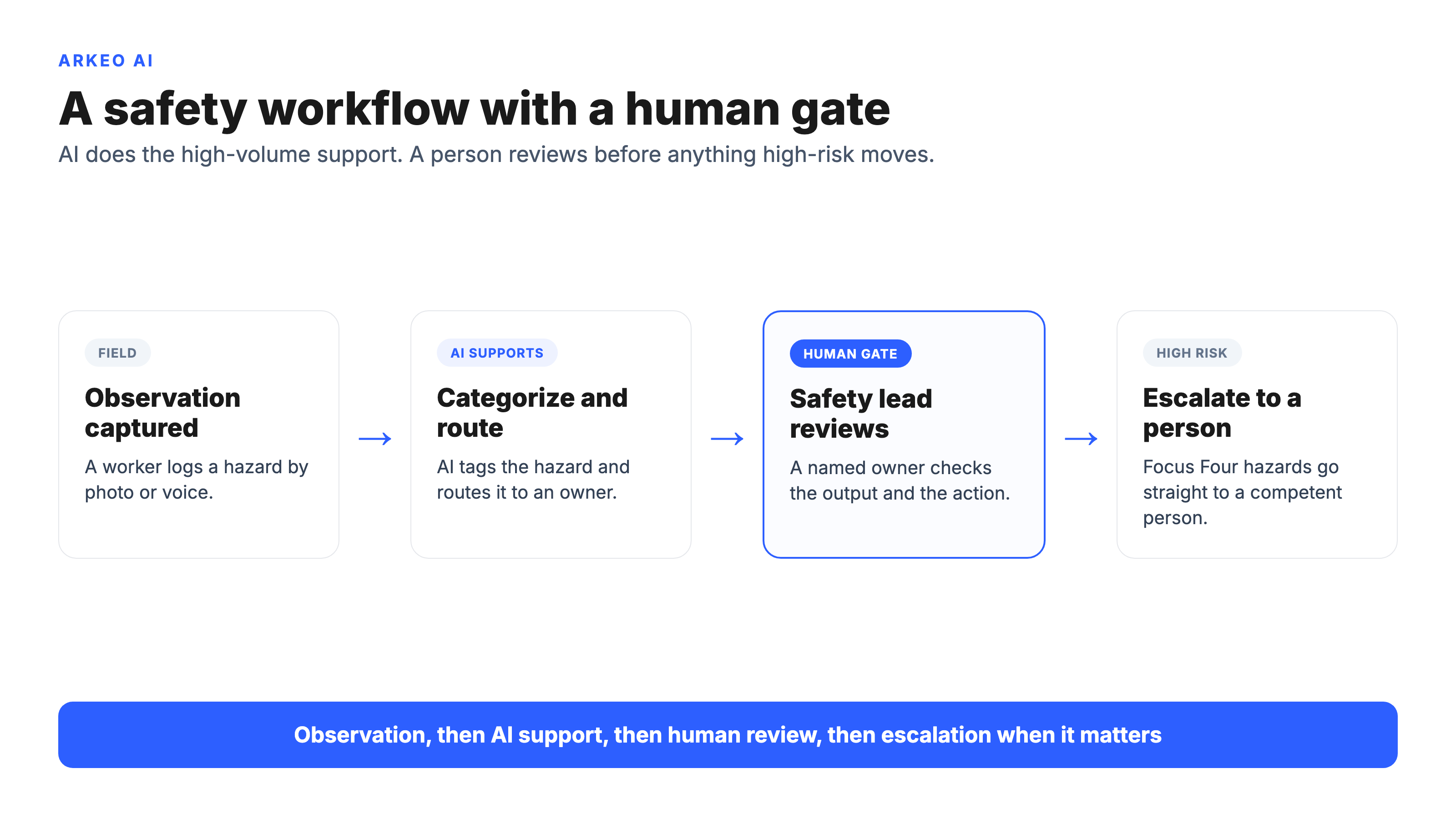
The first condition is consistent reporting workflows. AI needs structured, repeatable inputs to be useful, so if observations arrive five different ways on five different forms, the model has nothing dependable to work from. Standardizing how a hazard gets reported is the unglamorous prerequisite, and it pays off whether or not AI ever touches it. The second is clear review owners. Every AI-generated output, a categorized observation, a routed action, a drafted toolbox talk, needs a named person who reviews it and is accountable for what happens next. Support without an owner is just faster noise. The third is clear escalation logic: the workflow must define, in advance, which signals force a human review or a stop, so that anything touching the Focus Four hazards escalates automatically rather than being routed like a routine ticket.
Those conditions also point at a quieter risk. Safety data describes your sites, your incidents, and your people, and it is sensitive. The governance gap here is not hypothetical: in the IBM Cost of a Data Breach 2025 report, 97% of organizations that suffered an AI-related breach lacked proper AI access controls, which is exactly the discipline a safety workflow needs before it touches incident records. A workflow that quietly ships those records to a public model is its own governance failure, which is why Arkeo runs these workflows on private, on-premise infrastructure with access controls and human review, rather than pushing your safety records into a system you do not control. The same caution that keeps a human in the loop keeps the data inside your fence.
How Do You Pilot AI in a Safety Program Without Adding Risk?
The way to pilot AI in safety is to choose a low-regret use case and define the human checkpoints before anything goes live. A low-regret use case is one where a wrong AI output is caught and corrected by a human well before it can affect a worker, which is why an observation router is a far smarter first step than anything that touches a permit or a stop-work authority.
In practice, a low-regret safety pilot, such as an observation router that captures, categorizes, and routes hazard reports, is typically live in 30 to 90 days, and a human reviewer stays in the loop the entire time. Off-the-shelf document search across your safety manuals can start even faster. The point of starting narrow is not timidity, it is that a contained pilot lets you prove the workflow on real data, build trust with your safety team, and expand only into the next workflow that has earned it. The checklist below shows the use cases that are safe to test first and where the human checkpoint sits in each.
That last row is the rule, not the exception. Anything that authorizes work or removes a safeguard stays a human decision; AI can hand the reviewer cleaner information, but it does not get to make the call.
When Should Safety Be Your First AI Use Case?
Safety is a strong first AI use case when your reporting is already reasonably consistent, you have a named owner who can review outputs, and your biggest pain is administrative throughput rather than judgment. If observation cards are piling up unread and follow-ups are slipping, an observation router is a clean, defensible win. The technology and AI-adoption pressure described in the Deloitte 2025 Engineering and Construction Industry Outlook is real, but adoption pressure is a bad reason to start with safety; readiness is the right one.
Safety is the wrong first use case when your reporting is inconsistent, when no one has the bandwidth to own review, or when the workflow you most want to fix is genuinely a judgment call. In those cases a back-office workflow, document search, RFI triage, or scheduling support, may be the smarter first proof, and safety comes later once the organization trusts how the human-in-the-loop model works. For a wider view of how these pieces fit together, the pillar guide on AI in construction lays out the full landscape.
The honest tradeoff is this: safety carries the highest stakes and the highest scrutiny, which makes it both a meaningful place to prove value and an unforgiving place to get governance wrong. Treat it accordingly, start narrow, keep the human gate, and expand only when the workflow has earned it. The same discipline applies across the rest of the portfolio, whether you are looking at AI in construction management or the broader set of AI in construction examples teams are deploying today.
Decide whether safety is your right first workflow
In 60 minutes the free AI Assessment maps your safety bottlenecks, ranks the low-regret workflows worth piloting, and gives you a phased path with the human checkpoints built in, with no obligation to buy a build after.
Book Your Free AI Assessment →





