Category
What a Private AI Assistant Does for a Business
Last updated: May 2026
Your team already uses AI to draft, summarize, and look things up. The problem is where that work happens. Every time someone pastes a contract clause, a customer record, or an internal policy into a public chatbot to get a fast answer, that text leaves your control and lands on infrastructure you do not own. Microsoft's 2024 Work Trend Index found that 78% of employees who use AI at work are bringing their own unsanctioned tools to the job, and that leaders' top concern for the year ahead is cybersecurity and data privacy because of it. Arkeo AI has spent three years deploying AI agents into live operations and building the Arkeo Operating System (AOS), and the same request comes up in nearly every engagement: give us the speed of an AI assistant without the leak. That is what a private AI assistant is for.
Before you stand one up, it is worth being clear on what the tool should actually do, what it needs to connect to, and when it earns the investment. The right answer depends on your data, not on a feature list. A good starting point is a free AI Assessment that maps where your knowledge lives and whether an internal assistant is the right first use case, but read on first.
Quick Answer
• What it is: An AI assistant that answers from your company's own documents and data inside a boundary you control, instead of sending prompts to a public tool.
• Best uses: Internal knowledge search, document Q&A, drafting from approved sources, and onboarding support.
• When it is worth it: When knowledge is sensitive, scattered across systems, and looked up often by a team.
• Why it matters: 75% of knowledge workers already use AI at work, so the only real choice is whether that usage runs through a governed assistant or an unmanaged public one.
What Is a Private AI Assistant?
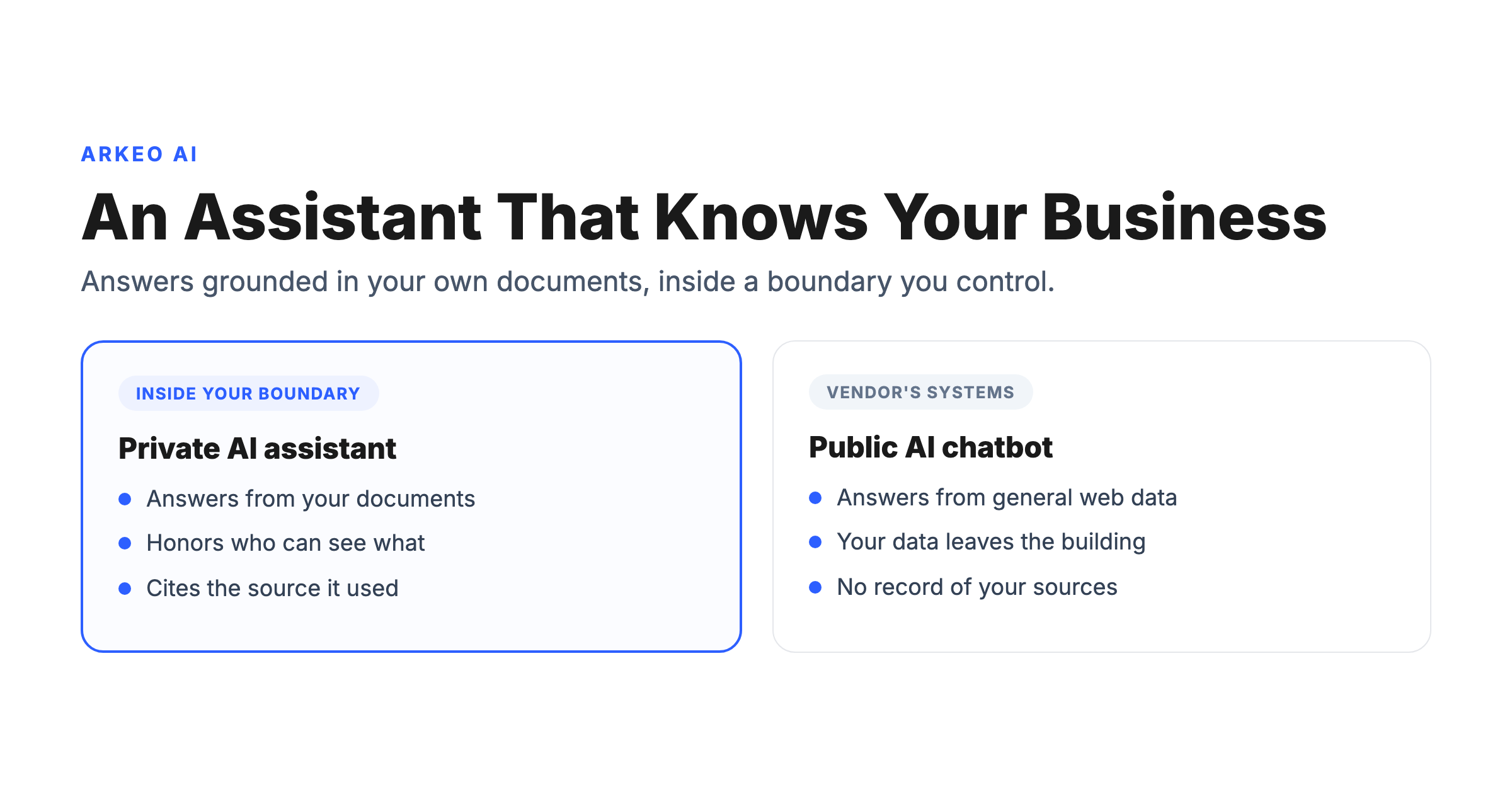
A private AI assistant is an internal tool that answers questions and helps with tasks by processing queries against your company's own documents and data, inside a boundary you control, rather than against a public internet index on a vendor's shared systems. Its responses are grounded in your policy manuals, standard operating procedures, past contracts, and meeting notes, not in generic training data scraped from the web. It looks like a chat box to the person using it, but underneath it is a business system with access rules, source control, and an audit trail.
The privacy boundary is the core feature, not a limitation. When an employee asks a public AI tool a question, the prompt, including any document text pasted into it, can be logged by the vendor or used to improve its models. An internally hosted or API-isolated assistant closes that channel of leakage by design. Microsoft and LinkedIn reported in the 2024 Work Trend Index that 75% of global knowledge workers, surveyed across 31 countries, now use AI at work. The usage is already in your building. A private assistant decides where it goes.
How Does It Differ From a Public AI Chatbot?
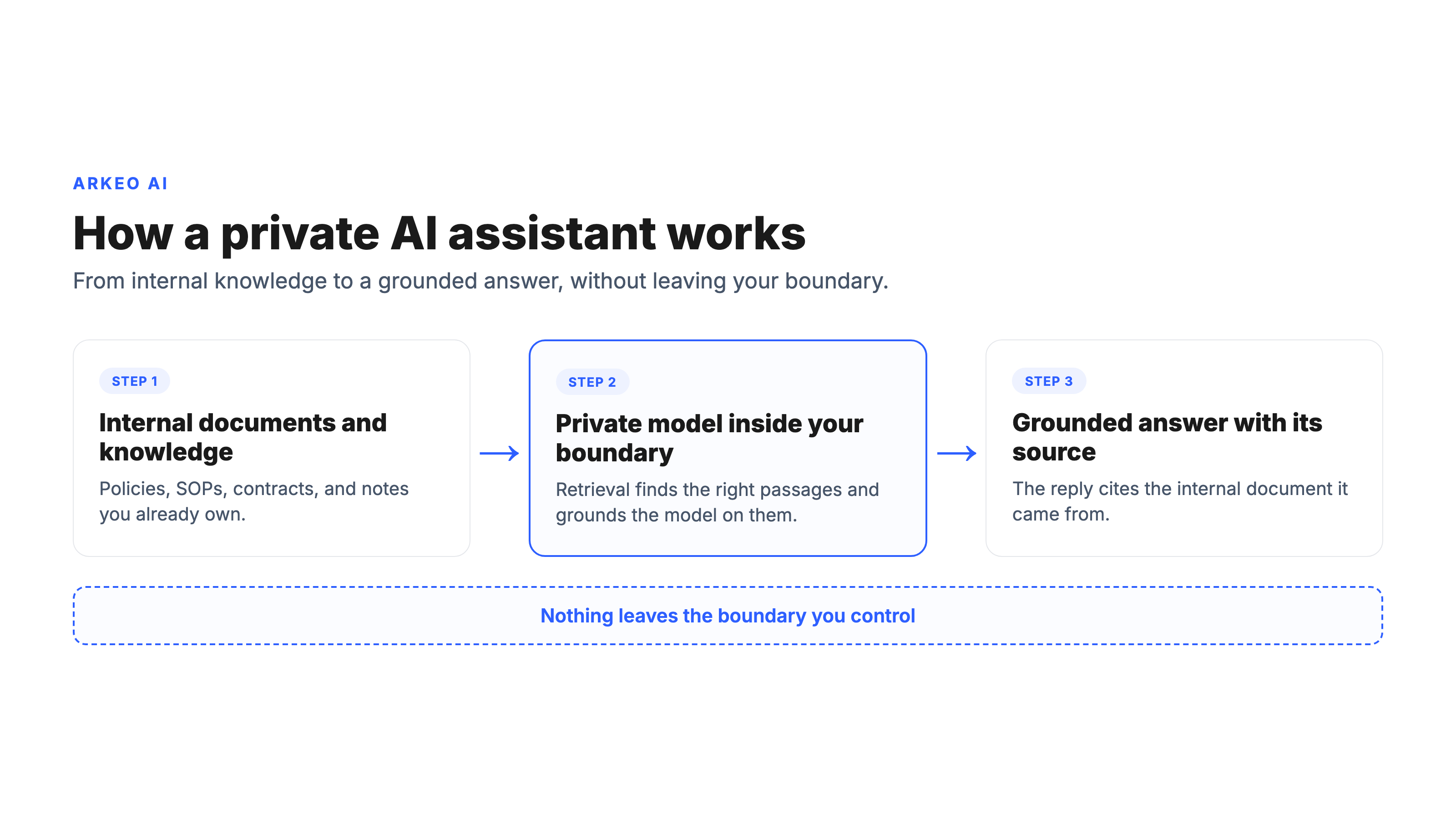
Follow the data and the source. With a public chatbot, your prompt leaves your network, runs on the vendor's compute, and the answer comes from the model's general training, with no knowledge of your business and no record of which of your documents informed it. With a private assistant, the round trip stays inside a boundary you define, and the answer is grounded in specific internal sources the system can cite.
That grounding is not magic. It is retrieval-augmented generation, or RAG: the way a private assistant connects to your documents without retraining the model. The assistant queries an index of your internal content at the moment of the question, pulls the relevant passages, cites the source, and returns a grounded answer. The practical payoff is that you update the knowledge base by adding or changing documents, with no expensive fine-tuning every time a policy changes.
This is also where a common false belief needs correcting. Most businesses assume a private AI assistant is just the public chatbot with a privacy setting switched on. It is not. A retention opt-out changes a vendor's policy; it does not change where inference happens, who controls the data, or whether the answer is grounded in your sources. The difference between a policy promise and an architectural boundary is the difference that an auditor, a regulator, or a security review actually tests. Cisco's 2024 AI Readiness Index, which surveyed thousands of senior business and IT leaders, found that 60% of IT teams cannot see the specific prompts or requests their employees make to generative AI tools, and that only 30% of organizations have the capabilities to protect data inside AI models with end-to-end encryption, monitoring, and rapid threat response. You can read the deeper infrastructure view in this guide to self-hosted AI.
See whether an internal assistant fits your team
The free AI Assessment maps where your knowledge lives, how often your team hunts for it, and whether a private AI assistant is the right first use case, before you commit a dollar.
Book Your Free AI Assessment →
What Should a Business Private AI Assistant Do?
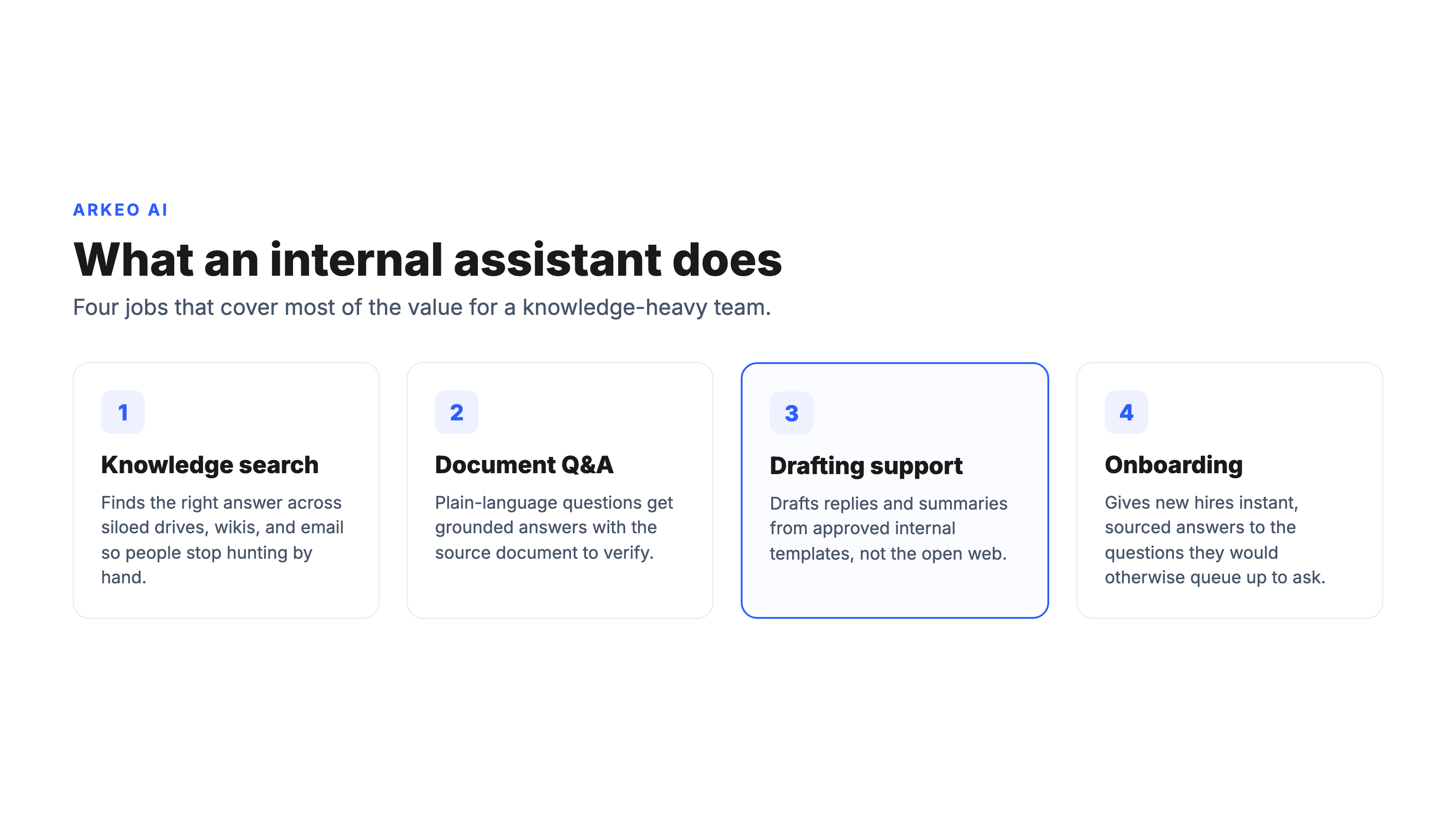
Frame the assistant as an internal business tool with access and governance constraints, not a general-purpose chatbot that happens to live behind your login. Four jobs cover most of the value.
Knowledge retrieval. The assistant finds the right answer across systems an employee would otherwise have to search by hand: the policy PDF, the SOP wiki, the contract folder, the buried email thread. Cisco's 2024 AI Readiness Index found that 81% of organizations say their data is siloed or fragmented across repositories, which is exactly the condition that makes a search-first assistant valuable.
Internal Q&A. Plain-language questions get grounded answers with a source to check. "What is our refund policy for enterprise contracts?" returns the clause and the document it came from, not a confident guess. That source link is what separates a useful tool from a liability.
Task and drafting support. Drafting a customer reply from approved templates, preparing for a meeting by pulling the relevant account history, or summarizing a long document, all from internal sources rather than the open web.
The largest field study on this kind of tool is worth knowing. Researchers at the National Bureau of Economic Research studied 5,179 customer-support agents using a generative AI conversational assistant and found it raised productivity by 14% on average, with a 34% gain for novice and lower-skilled workers, while also improving customer sentiment and reducing attrition. The gains were largest where the assistant put institutional knowledge in reach of people who did not yet have it in their heads. That is the pattern a well-built internal assistant repeats.
When Is a Private AI Assistant Worth It?
A private assistant is not the right first move for every team, and an honest advisor will say so. Its value is highest where three conditions line up: the knowledge is sensitive or regulated, it is fragmented across many systems, and it is looked up often by a team rather than rarely by one person.
Sensitive knowledge is the first trigger: if the information your people look up is the thing your business is built to protect, sending it to a public tool to save a few minutes is a poor trade. Fragmentation is the second: when the same recurring answer lives in five places and nobody is sure which copy is current, a grounded assistant consolidates the lookup without replacing anyone's judgment. Frequency is the third: an assistant used a hundred times a day pays for itself in a way that one used twice a week never will.
The scale of the upside is real. McKinsey's research on generative AI estimates it could automate work activities that currently absorb 60% to 70% of employees' time, with the highest impact on knowledge work involving decision-making and collaboration. Deloitte's State of AI in the Enterprise found that about two-thirds of AI-adopting organizations report improved productivity and efficiency, so the gains are broadly realized rather than a vendor claim. Gartner projects that by 2026 more than 80% of enterprises will have used generative AI in production, up from fewer than 5% in 2023. The tool is becoming standard. The question is whether yours is governed.
Here is the blunt truth a brochure leaves out: a private AI assistant is a system you operate, not a product you switch on. The model has to be kept current. The index has to be refreshed when documents change. Permissions have to be reviewed when people change roles. A poorly maintained internal assistant that serves stale or wrongly scoped answers is worse than no assistant at all, because people trust it. Three years of deploying these systems into live operations has made that the first thing Arkeo AI tells a prospective client, not the last. For the conversational front end specifically, this guide to private AI chat goes deeper.
What Should You Get Right Before Rollout?
Most failed internal assistants fail on three things, all of which are decided before launch, not after.
Permissions. Permission boundaries are not optional. A useful assistant must know which user can see which documents, and it must enforce that at the retrieval layer, not bolt it on afterward. An assistant that surfaces an answer from a file the requesting employee has no right to read is a governance failure dressed up as a feature. This is the single most common reason a pilot gets paused, and the single hardest thing to retrofit.
Source quality. A grounded assistant is only as good as what it is grounded in. Point it at a shared drive full of duplicate, outdated, and contradictory files, and it will confidently cite the wrong version. The work of curating which sources the assistant trusts, and keeping them current, is the unglamorous part that determines whether the answers hold up.
Review model. Decide up front how answers get checked and how the system improves. Which questions need a human in the loop, who owns the knowledge base, and how feedback flows back into the sources. IBM is a useful reference point here: it deployed an internal assistant called AskIBM to its more than 280,000 employees, grew its knowledge base from roughly 5,000 to more than 30,000 internal documents over six months, and estimated millions of employee hours saved. That scale only works because the source base and review model were treated as the product, not as setup.
This is the staged path Arkeo AI has used since 2023, drawing on 25 years of business experience and the principle that we use what we sell: map your current state and the lookups that eat your team's time, ship the easy wins first, build the assistant against a curated source base with permissions wired in, then expand it as trust is earned. The on-premise and private AI deployments Arkeo recommends are the ones it runs on its own systems.
Find out if a private AI assistant is your right first step
The free AI Assessment is a 60-minute planning session that reviews your knowledge sources, permissions, and lookup patterns, then recommends whether a private assistant fits and how to roll it out safely.
Book Your Free AI Assessment →





