Category
On Premise AI: When to Run AI In-House
Last updated: May 2026
Your compliance team has flagged the AI tool your operations group wants to roll out, and the question on the table is no longer whether the model is good. It is where your data goes the moment an employee hits enter. For a regulated business, that single question can stall an otherwise sound AI plan for months. Arkeo has spent three years deploying AI agents into operating businesses, including on-premise and private setups where the data never leaves the building, so this is familiar ground rather than theory. The pull toward keeping AI in-house is not paranoia, either. In the 2025 Thales Data Threat Report, a survey of more than 3,100 IT and security professionals across 20 countries, nearly 70% of organizations named AI's fast-moving ecosystem as their top generative-AI security risk, and 73% said they are investing in AI-specific security tools (Thales 2025 Data Threat Report). The honest problem is that on-premise AI fixes some of that risk and adds a different kind of burden, and most buyers cannot tell from a vendor pitch which side of that trade they are on. The fastest way to find out for your environment is the free AI Assessment, which maps where your data actually has to live before anyone proposes hardware.
Quick Answer
• What it is: AI models and the data they process running entirely on hardware you own and operate inside your own facilities.
• Cost shape: high fixed cost up front (servers, GPUs, software licenses around $4,500 per GPU per year for NVIDIA AI Enterprise), low marginal cost per query after.
• Best fit: regulated data, continuous high-volume inference, and real-time workloads that cannot tolerate a network round trip.
• The catch: the operational overhead of running it moves from a cloud provider to your internal team.
• Why it matters: on-premise is one option inside a broader private-AI strategy, not an automatic upgrade.
What Is On-Premise AI?
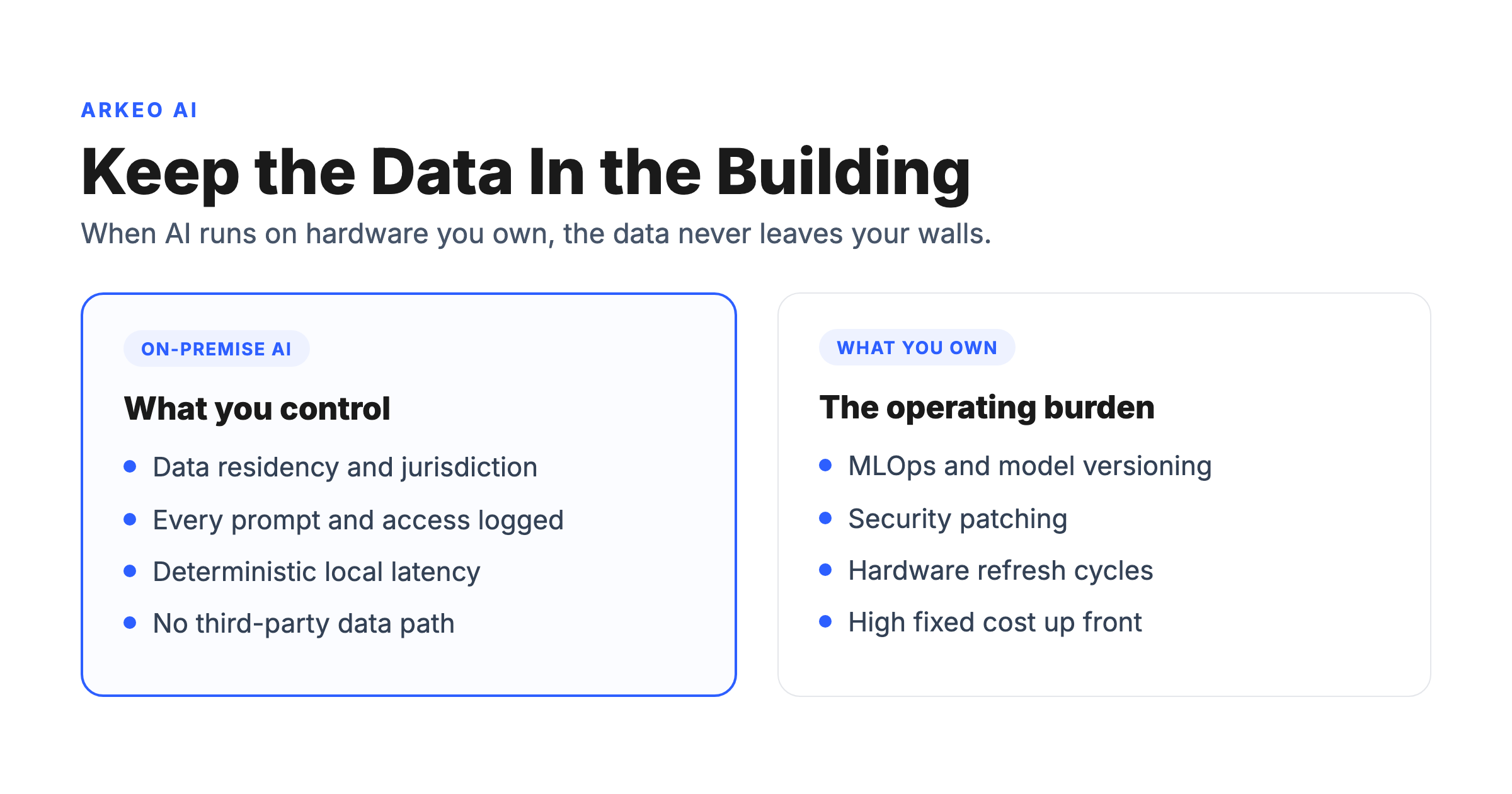
On-premise AI means the models, the inference engines, and the data they process all run on hardware your organization owns and operates inside its own facilities, so no data crosses a network boundary to reach compute owned by a third party. That is the whole definition, and the last clause is the part that matters. A cloud AI service sends your prompt and your data to someone else's data center to be processed. On-premise AI does the processing where the data already lives, behind your own firewall, under your own access controls.
The reason this distinction is sharper than it looks is jurisdiction, not geography. The question that decides compliance is not where a cloud provider's servers physically sit, but who has legal authority over the operator. Under the U.S. CLOUD Act, a U.S.-headquartered provider can be compelled to produce data stored in any country, which is why a European regulated entity cannot satisfy data-transfer rules simply by selecting a European cloud region. On-premise removes that exposure by removing the third party entirely. The regulatory backdrop is hardening, too: the EU AI Act entered into force on August 1, 2024, with obligations for high-risk systems, including documentation, logging, and data governance under Article 10, taking full effect on August 2, 2026, and penalties reaching 3 to 7% of global annual turnover (EU AI Act, European Commission).
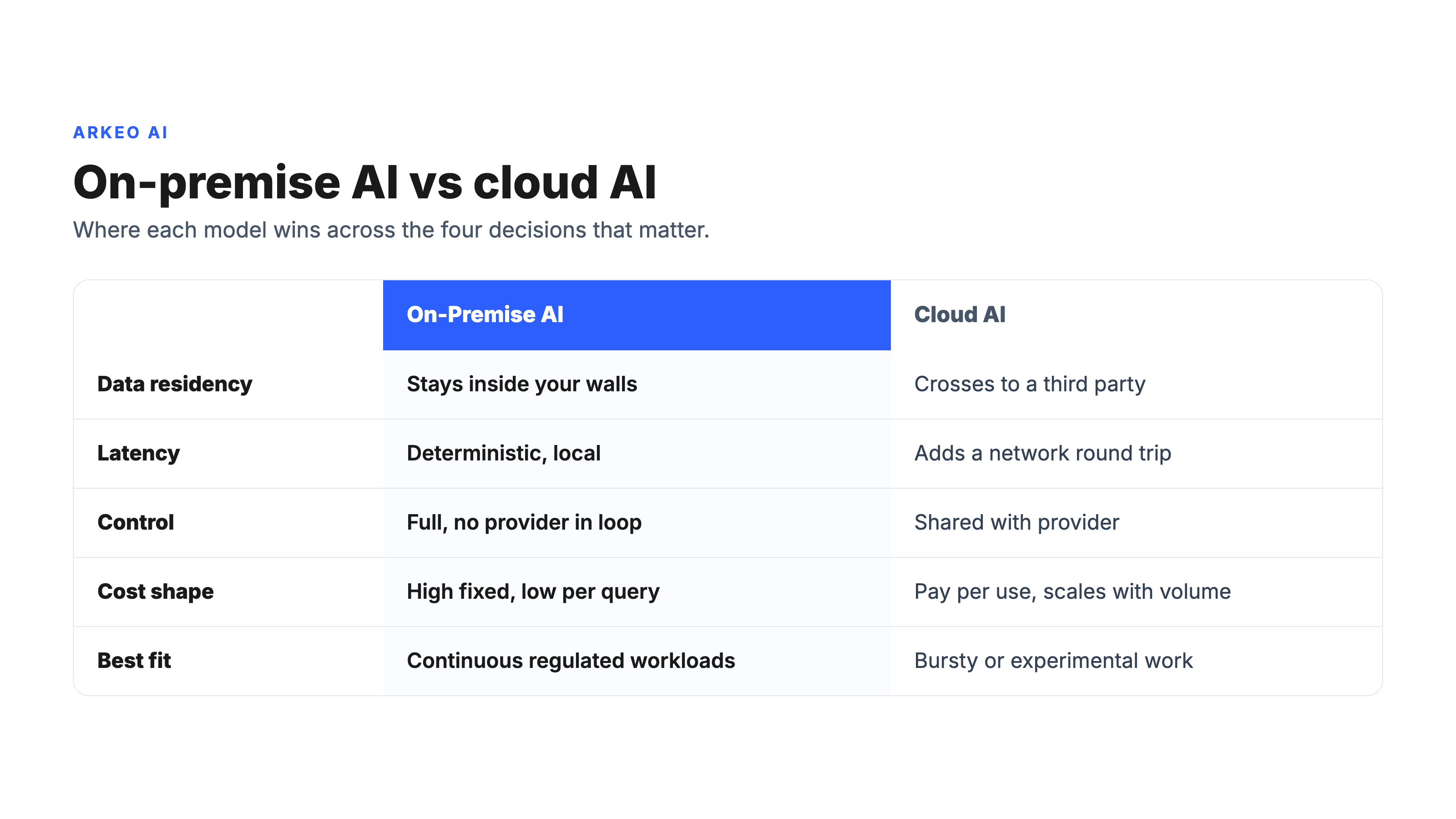
Here are the drivers that push regulated operators toward keeping AI in-house, and what each one actually trades for.
How Does On-Premise AI Differ From Private Cloud or Hybrid AI?
On-premise is the most controlled point on a spectrum, not a category by itself. Private cloud AI runs in infrastructure dedicated to you but still operated by a provider, often in their data center, which gives you isolation without the burden of owning the hardware. Hybrid AI keeps the most sensitive workloads in-house while sending less sensitive or bursty work to the cloud, which is where many real deployments land once the dust settles. On-premise sits at the far end: maximum control, maximum responsibility.
The split in the market reflects this. IDC reports that global AI server spending reached $47.4 billion in the first half of 2024, with cloud and digital service providers taking nearly three-quarters of that spend and roughly a quarter landing in enterprise on-premise environments, even as traditional enterprises faced hardware supply delays of up to 36 weeks for GPU-accelerated servers. On-premise demand is real and supply-constrained, not absent. Gartner separately forecasts that through 2027, half of critical enterprise applications will reside outside centralized public cloud locations, the broader pattern on-premise AI is part of.
See where on-premise AI actually fits
Arkeo's free AI Assessment is a 60-minute planning session that maps your data boundaries, ranks the workloads worth running in-house, and tells you honestly whether on-premise, private, or hybrid is the right call, before you commit a dollar to hardware.
Book Your Free AI Assessment →
Why Do Companies Choose On-Premise AI?
The drivers cluster into four, and each one carries an operational consequence that only shows up after the deployment is live, not in the sales deck.
Residency is the one that starts most projects. The operational consequence is that a data-transfer impact assessment, the kind GDPR Article 35 expects, becomes a checkbox instead of a quarterly negotiation, because there is no cross-border path to assess. A regulated lender no longer has to renew and defend a transfer mechanism every time a cloud provider changes a subprocessor; the records simply never leave the jurisdiction. Latency looks like a performance nicety until a workload depends on it. Fraud scoring at the point of transaction, industrial control loops, and clinical decision support all have a hard ceiling measured in single-digit milliseconds, and the operational consequence of a 20 to 50 ms cloud round trip is not a slower app, it is a workload that cannot run at all. Control means no provider can change pricing, deprecate a model version your compliance documentation depends on, or be compelled to hand over data under a subpoena you never see; the operational consequence is that your model lifecycle is governed by your change-control board rather than a vendor's release calendar. Cost is the driver buyers reach for and misjudge most often: the operational consequence of high fixed cost is that the spend is committed before the first query runs, so a workload that turns out to be bursty leaves expensive hardware idle, while a continuous workload turns that fixed cost into the cheapest option per query.
These are not fringe motivations anymore. Gartner predicts that by 2027, 70% of enterprises adopting generative AI will rank digital sovereignty as a top criterion when choosing between cloud GenAI services, and Gartner also forecasts worldwide sovereign cloud infrastructure-as-a-service spending will reach $80 billion in 2026, a 35.6% increase over 2025, led by governments and regulated industries. In financial services specifically, the Thales 2024 Data Threat Report found that 64% of organizations consider cloud data security more complex than on-premises environments, and 43% believe organizations should keep access security control internal rather than handing it to a cloud provider (Thales 2024 Data Threat Report, Financial Services).
What Are the Tradeoffs of On-Premise AI?
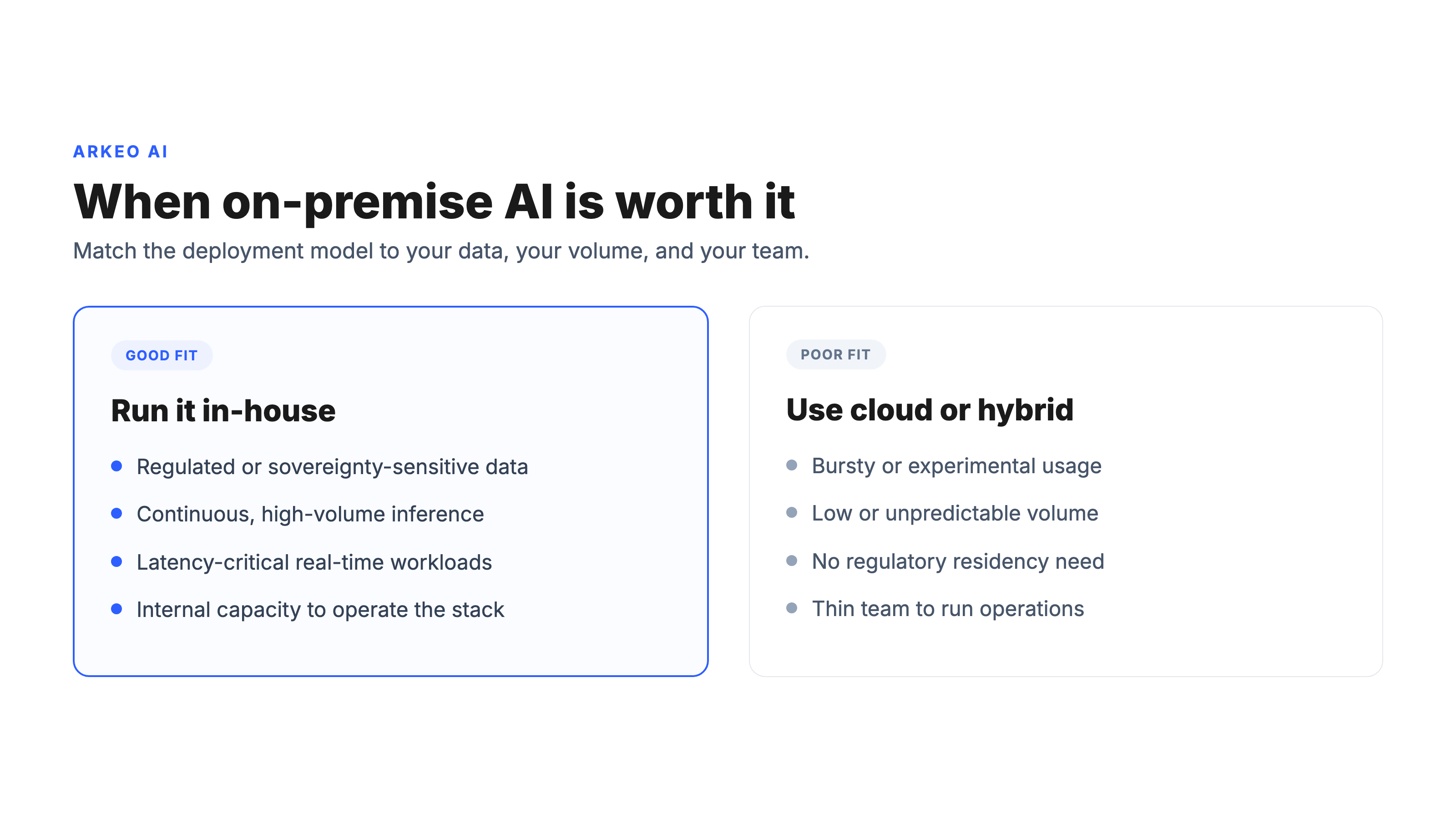
Here is the blunt truth a hardware vendor will not lead with: on-premise AI does not mean unmanaged AI. The operational work does not disappear when you bring AI in-house. It moves to you. You still need MLOps infrastructure, model versioning, security patching, and a hardware refresh cycle, and now your team owns all of it instead of a cloud provider's on-call rotation. That is the real cost, and it is the one buyers underestimate.
The money side is more favorable than the reputation suggests, but only for the right workload. NVIDIA prices its AI Enterprise software for self-managed, on-premise GPU deployments at $4,500 per GPU per year, or $22,500 per GPU for a perpetual license with five years of support; the cloud equivalent runs about $1 per GPU per hour plus the provider's instance costs (NVIDIA AI Enterprise pricing). Run a GPU continuously, roughly 8,760 hours a year, and the cloud software alone costs around $8,760 per GPU per year against $4,500 on-premise, so the licensing breaks even in under six months for steady-state workloads. The economics flip the moment your usage is bursty or experimental: then cloud's pay-for-what-you-use model wins, because amortizing fixed hardware over three to five years only pays off under continuous, high-volume inference.
So the tradeoff is not control versus cost in the abstract. It is fixed cost plus operational ownership in exchange for residency, latency, and audit certainty. For a continuous regulated workload, that trade is often worth it. For an early experiment, it usually is not.
If you are not sure which side of that trade your workload lands on, the free AI Assessment maps it against your real data boundaries and usage pattern in about 60 minutes.
This is exactly the deployment-model decision that the broader pillar on running AI inside a controlled environment works through end to end, including how self-hosted, private, and hybrid options stack up once you know your constraints.
When Is On-Premise AI the Right Call?
Most businesses think on-premise AI is the most secure option and therefore the best one. They are wrong, or at least half wrong. On-premise removes one category of risk, the third-party data path, while handing you a category of work, the full operational stack, that a thinly staffed team can run worse than a mature cloud provider would. Security is an outcome of how well something is run, not just where it sits. A neglected on-premise GPU cluster with stale patches is not safer than a well-governed private cloud.
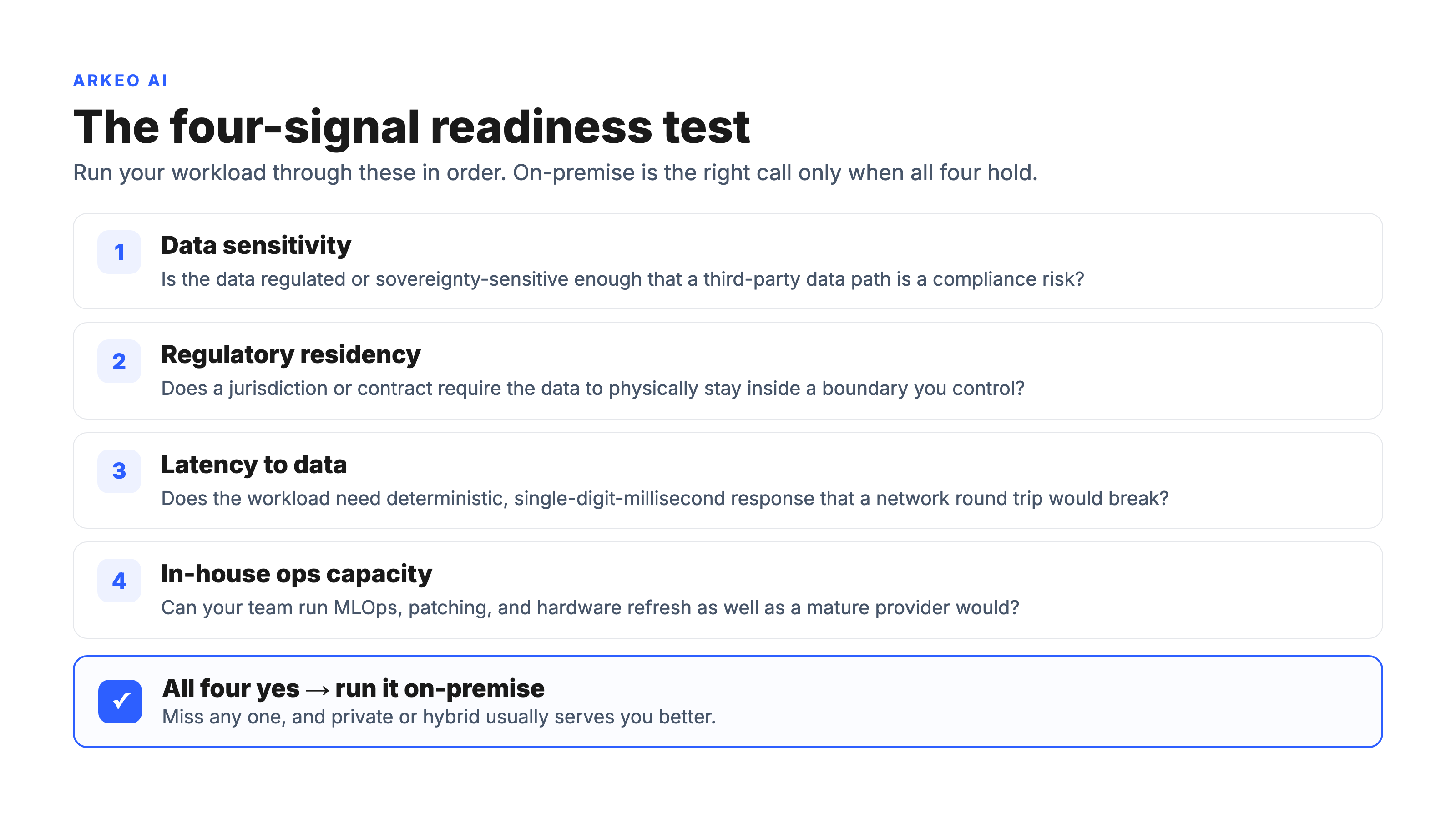
On-premise is the right call when several signals line up. The data is regulated or sovereignty-sensitive. The inference is continuous and high-volume, so fixed costs amortize. The workload is latency-critical and cannot absorb a network round trip. And you have, or are willing to build, the internal capacity to operate it. When those hold together, in-house wins decisively. When they do not, hybrid or private cloud usually beats it.
Picture a regional bank with a roughly 40-person technology group weighing an AI document-review agent for loan files. The data is regulated, the volume is steady, and latency matters at the branch, so on paper on-premise fits. The honest question is the operating one: can a 40-person team take on GPU refreshes, model versioning, and round-the-clock patching on top of its roadmap, or would a private deployment someone else operates get the same residency story without the staffing risk? That is what decides it, not the spec sheet. Where on-premise and a managed setup converge, the question of how a private AI deployment is owned and operated separates the two paths.
Before committing, run your environment against the residency questions that actually decide the model.
On-premise readiness checklist
1. Residency. Is the data under a regulation or jurisdiction that a third-party data path would violate?
2. Volume. Is inference continuous and high-volume enough to amortize fixed hardware over three to five years?
3. Latency. Does the workload need deterministic response times that a network round trip would break?
4. Capacity. Do you have, or will you fund, the team to run MLOps, patching, and hardware refresh internally?
If you answer yes to all four, on-premise is likely justified. If you answer yes to residency but no to capacity, a private or hybrid deployment usually serves you better. Arkeo was founded in 2023 on 25 years of running real businesses, and we use what we sell, which is why our default recommendation is whatever genuinely fits your constraints, not the most hardware we could install.
Find out if on-premise AI is justified for you
In 60 minutes the free AI Assessment maps your data boundaries, your workload pattern, and your team capacity, then tells you straight whether on-premise, private, or hybrid is the right deployment model, with no obligation to build anything.
Book Your Free AI Assessment →





