Category
Preparing Your Data for Custom AI Agents
Last updated: June 2026
If you run a $10M to $200M operation and a board, a CFO, or an integrator has just told you the next AI agent build depends on your data being ready, the temptation is to nod, kick off the project, and assume the warehouse will catch up. It will not. Most mid-market custom agent projects do not stall on the model; they stall the day the engineer tries to read a quote out of a vendor PDF, join it to the customer record in the CRM, reconcile it with the inventory snapshot in the ERP, and realize the three systems disagree on the SKU. Twelve weeks and $40,000 later, the agent ships as a slow draft generator that a human still has to verify line by line, the ROI never lands, and the budget for next year's AI line item gets quietly cut. In this guide, you will get the operator-grade data audit Arkeo runs before any custom agent is built, the seven things an agent actually consumes from your stack, the schema, join, lineage, freshness, and access checks each one must pass, and a one-page pre-build checklist you can take to your CIO so the agent reaches production instead of pilot purgatory.
Arkeo has spent three years deploying AI agents on its own operations and on mid-market client engagements, including agents that read inbound RFQs, query an ERP for stock and lead time, and write approved quotes back to the CRM. The failure mode that recurs across those builds is not model quality. It is data. Specifically, it is the assumption that "the data is in the system somewhere" meaning the same thing as "the agent can reach it, in the right shape, fresh, and with the right permissions." This guide is what data preparation looks like when the goal is a production agent, not a chatbot.
Quick Answer
• What it is: AI data readiness is the condition of your data, schemas, joins, lineage, freshness, and access controls measured against what a specific custom agent will read, write, and act on.
• What agents actually consume: Structured rows from systems of record, structured exports from operational tools, parsed unstructured text (PDFs, emails, notes), and a small set of reference tables (price lists, approval thresholds, SKU maps).
• How you prepare it: Inventory sources, score quality on 100-row samples, document joins and lineage, define freshness SLOs, classify sensitivity, and design the agent's read and write permissions before the build starts.
• Why it matters: Skipping the data layer is the single most common cause of stalled custom agents and the $670,000 added breach cost per IBM 2025 when an ungoverned AI workload touches data it should not.
• Next step: Book a free AI Assessment. Arkeo will audit one of your workflows to see if you are ready for custom agents.
AI DATA READINESS FOR CUSTOM AGENTS
Four takeaways for the data layer
What an agent actually consumes, how the audit works, where quality breaks, and what to lock down first.
INPUTS
Seven sources, not one
Systems of record, operational tools, parsed documents, inbox and messaging, reference tables, external feeds, written runbooks.
AUDIT
Four passes on one workflow
Source inventory, 100-row quality probe, integration map, sensitivity and risk profile. Output: go, fix-first, or no-go.
QUALITY
Five checks agents fail on
Schema stability, join integrity, lineage, freshness SLO, completeness and labeling. Score each 1 to 5.
PRE-BUILD
Eight items locked down
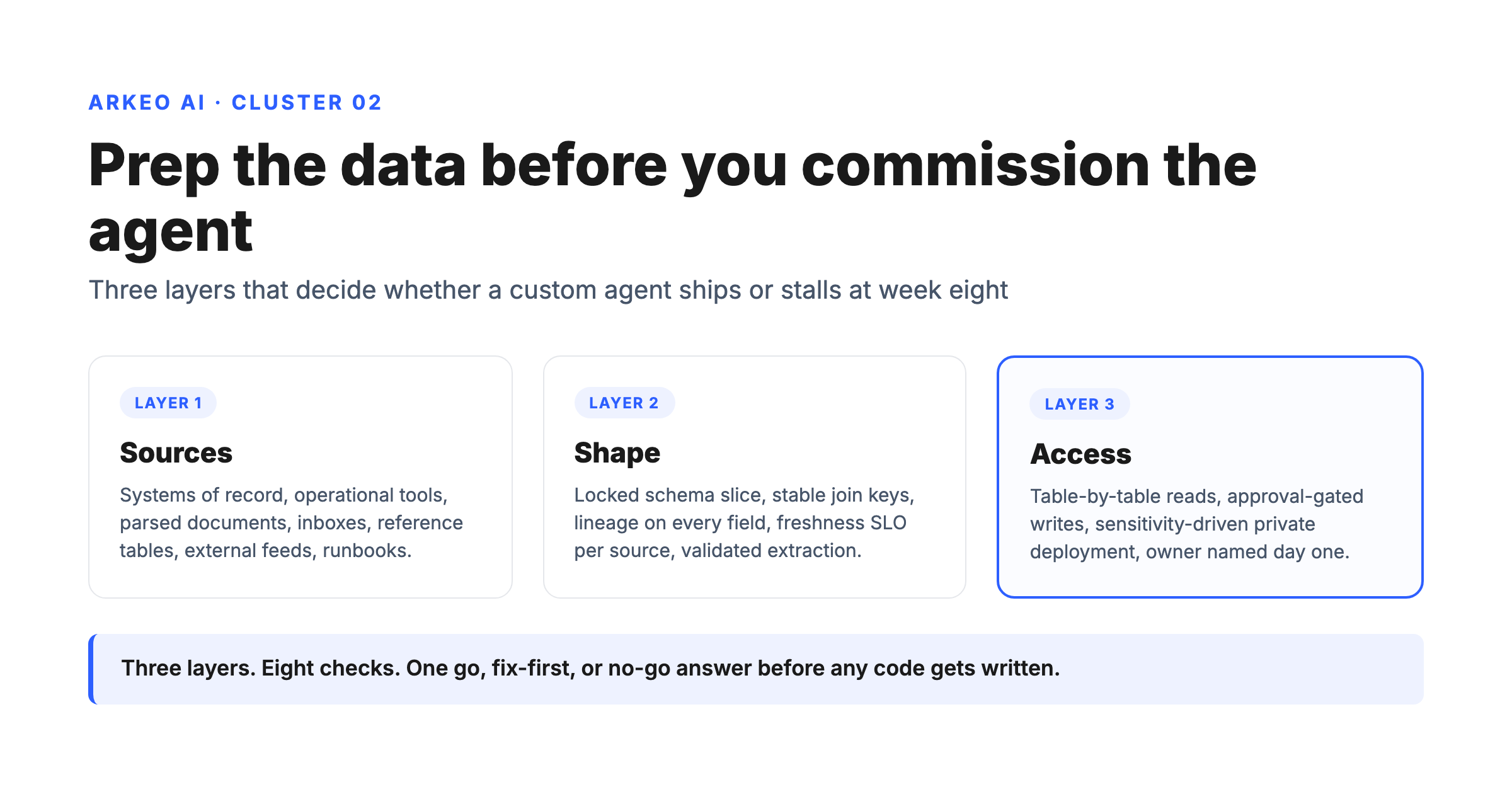
Inventory, samples, schema slice, join keys, lineage, freshness, sensitivity classification, access design.
Do the data work first. The build runs 6 to 10 weeks. Skip the data work and it runs 12 to 20 and ships as a draft generator.
What does AI data readiness actually mean for a custom agent?
AI data readiness is the workload-specific condition of every data source, schema, join, lineage trail, freshness window, and access control that a single custom agent depends on, scored against go, fix-first, or no-go for the build. The phrase has been hollowed out by vendors who use it to mean "your warehouse is tidy." A tidy warehouse helps. It does not, by itself, make the agent ready, because agents do not run on a warehouse alone. They run on a working slice of your operating systems, with reads and writes that touch decisions in real time.
The Deloitte State of Generative AI Wave 4 survey of 2,773 C-suite and director-level leaders across 14 countries found that more than two-thirds of enterprise respondents expect 30% or fewer of their GenAI experiments to be fully scaled within the next three to six months. The most common reason those experiments do not scale is a data layer that was treated as someone else's problem. BCG research published in October 2024 put the same gap in money terms: 74% of companies struggle to achieve and scale value from AI, and only 4% have built cutting-edge AI capabilities that consistently generate significant value. The data layer is the gap.
What does a custom AI agent actually consume from your stack?
Most operators picture an agent as a smarter chatbot reading documents. A production agent is closer to a junior analyst with API keys. It reads structured rows, parses unstructured text, joins them, applies rules, and writes back into the systems where the rest of the business operates. Before any data preparation work makes sense, name the seven inputs the agent will consume.
INPUT 01
Systems of record
ERP, CRM, accounting, HRIS. Structured rows the agent reads via API or replicated to a warehouse. Read access is table-by-table, never blanket database access.
INPUT 02
Operational tools
Ticketing, project management, e-signature, scheduling. Structured exports or API reads. Often the freshest data in the business and the most fragmented.
INPUT 03
Unstructured documents
RFQs, contracts, drawings, invoices, reports. PDFs and Office files. Useless until they are parsed, OCR'd, chunked, and indexed; one of the largest hidden costs of a custom build.
INPUT 04
Inbox and messaging
Shared mailboxes, Slack channels, Teams. Often where the real commitment lives. Treat as a streaming source with the same lineage and retention rules as any other system.
INPUT 05
Reference tables
Price lists, SKU maps, approval thresholds, tax rules, branch hours. Small, slow-moving, and decisive. The single most-skipped input on a first build.
INPUT 06
External feeds
Supplier portals, public APIs, market data, regulator publications. Read-only. Cache aggressively. Test the failure mode when the feed is slow or down.
INPUT 07
Human knowledge
Runbooks, SOPs, pricing policy, the unwritten rule the senior estimator carries in their head. Has to be written down before the agent can use it.
Most mid-market businesses think their data problem lives at the database layer. The data problem is usually two steps upstream, in the inputs that never made it into a database to begin with: inspection notes in a tradesperson's notebook, customer commitments captured in a Slack DM, pricing exceptions agreed on a phone call and never reconciled. Until that data is captured, no model however good has anything to reason over. That is the false belief most readiness frameworks miss.
How do you run an AI data audit on a single workflow?
The audit is the highest-leverage exercise in cluster 02 readiness, because every other readiness question downstream depends on it. Arkeo runs the audit in four passes against a single candidate workflow, not the whole company. Trying to audit the company before the workflow is the most common reason audits stall.
Pass one is the source inventory. List every system, document store, inbox, spreadsheet, and human notebook the agent will need to read from or write to. Pass two is the quality probe: pull a 100-row sample from each digital source and score it for completeness, correctness, consistency, and currency. Pass three is the integration map: for each source, document the access route (API, SDK, export, OCR, manual entry), the latency, the cost, and the failure mode. Pass four is the risk profile: classify the data by sensitivity, identify regulated fields (PII, PHI, financials), and decide where the workload must run (cloud, private cloud, or on-premise) before any agent is built.
The output of the audit is a one-page diagnosis: a go, fix-first, or no-go decision for this specific workflow, with the gaps named in plain language and the fix sequenced. The longest item on the no-go list is almost always parsing a backlog of unstructured documents that the operator did not consider data until the audit asked.
Audit your workflow before you commission an agentArkeo's free AI Assessment runs the four-pass data audit on one of your workflows and tells you whether your data layer is ready for a custom agent, or what to fix first.
Book Your Free AI Assessment →
Which data quality checks does an agent actually fail on?
An off-the-shelf chatbot tolerates a surprising amount of bad data because it does not act on it. A custom agent that reads from the CRM, joins to the ERP, and writes a quote back into the system will fail on quality issues that a human used to absorb without noticing. The five checks below catch most of them in the audit, not at week eight of the build.
Schema stability. Do the columns the agent needs exist in the system today, with the same names and types they had a month ago? Sales-ops teams rename fields without telling anyone. The agent will break the next day. Lock the schema slice the agent reads and version it.
Join integrity. Can the agent reliably map the same customer, SKU, or job across CRM, ERP, and ticketing? Mid-market companies typically run two or three competing customer identifiers and a SKU map that drifts every quarter. Without a stable join key the agent will report wrong numbers, confidently.
Lineage and provenance. For every field the agent reads or writes, who produced it, when, and through what system? An agent that writes a quote needs to be able to show its work. Lineage is the audit trail the CFO and the auditor both expect within twelve months of go-live.
Freshness. What is the maximum staleness the agent can tolerate per source? Inventory data twelve hours old can sink an automated quote. Customer status six minutes old is fine for a renewal workflow. Define a freshness SLO per source before the build.
Completeness and labeling. Are required fields populated, and is the labeling that the agent relies on (deal stage, job phase, approval status) actually used by the humans who own the system? An unlabeled deal stage is invisible to the agent, no matter how good the model.
The blunt truth most vendors will not say: AI agents break. Regularly. They break first on data quality issues that were known and shrugged off long before AI showed up. The audit's job is to surface those issues with a price tag attached so the operator can fix them, accept them, or scope around them before the build.
Want to talk this through against your specific situation? Book a free assessment. Thirty minutes, working session, focused on one workflow.
How do you handle unstructured data and what agents actually do with it?
Roughly two-thirds of the data that matters in a mid-market business sits in unstructured form: PDFs, scanned contracts, emails, drawings, photos, voice notes, scanned invoices. A custom agent does not read these natively. They have to be turned into structured inputs through a parsing layer that runs as part of the build.
That parsing layer has four jobs. First, ingestion: pull the document from where it lives (SharePoint, email, an archive) and store a canonical copy. Second, extraction: OCR (for scans), structured field extraction (for forms), and full-text extraction (for body content). Third, chunking and embedding: split the document into retrievable pieces and index them for semantic search. Fourth, validation: spot-check the extracted fields against a small ground-truth set so the agent does not silently hallucinate a quantity or a price.
This is also where private deployment matters most. The IBM 2025 Cost of a Data Breach report found the global average breach now costs $4.44 million, the US average has hit an all-time high of $10.22 million, organizations with high shadow-AI usage incur an extra $670,000 per breach, and 97% of organizations that suffered an AI model or application breach lacked proper AI access controls. For workloads that touch regulated documents (financial records, health information, contracts with confidentiality clauses), Arkeo deploys the parsing layer on-premise or in a private cloud so the document never leaves the building. We use what we sell.
How does AI data readiness sit inside the broader ai readiness picture?
Data is one leg of the readiness stool. The other two are infrastructure (can the agent reach the systems where decisions happen) and culture (does a named operator own the agent the day after it ships). The full picture and the five-stage maturity model lives on the ai readiness pillar. The point of this article is the data layer specifically, because data is the leg most operators discover is short only after the build has started.
One useful cross-reference: an ai audit covers the same four passes against the whole company. An ai readiness assessment packages the audit plus the maturity scoring into a single engagement output. The audit is the workhorse. The assessment is the deliverable the board reads.
What does a ready data layer look like in practice?
Picture a 200-person specialty manufacturer with one custom quoting agent in production. The agent reads inbound RFQ PDFs from a shared mailbox, parses spec lines through a tuned OCR plus extraction stack, joins them to the SKU map (a versioned reference table), queries the ERP REST API for stock and lead time, applies the margin policy from a small rules table, drafts the quote, and routes it through a Slack approval queue to the sales engineer. Approved quotes are written back to the CRM with full lineage on every field.
The data layer behind that agent has eight things in place: a documented source inventory, scored quality samples, a locked schema slice per system, a versioned SKU map, a freshness SLO per source, a parsing pipeline with a ground-truth validation set, classification of regulated fields with private deployment for the sensitive ones, and a named owner for the data layer itself, not just the agent. That is what ready looks like. The build is six to ten weeks. Without the data layer in place first, the same build runs twelve to twenty and ships as a draft generator instead of an operating tool.
The PwC AI Agent Survey of 300 senior US executives in May 2025 reports 79% of US businesses already adopting AI agents and 88% planning to increase AI-related budgets in the next 12 months. The budget is coming. The companies that turn that budget into a working agent will be the ones that did the data work first.
The pre-build data checklist (take this to your CIO)
SOURCES
Inventory complete
Every system, document store, inbox, and human input touched by the workflow is named, owned, and access-mapped.
QUALITY
100-row sample scored
Completeness, correctness, consistency, currency scored 1 to 5 per source. Any score below 3 is fix-first.
SCHEMA
Slice locked and versioned
The columns the agent reads are documented, typed, and versioned. Renames are an event, not a surprise.
JOINS
Stable keys defined
Customer, SKU, job, and entity identifiers map cleanly across every system the agent touches.
LINEAGE
Provenance per field
Every field the agent reads or writes can be traced back to its source system, author, and timestamp.
FRESHNESS
SLO per source
Maximum staleness defined in minutes, hours, or days per source, with monitoring on the breach.
SENSITIVITY
Regulated fields flagged
PII, PHI, and financial fields classified. Workload runs on-premise or in a private cloud where the law or contract requires it.
ACCESS
Agent permissions designed
Reads are table-by-table. Writes have explicit approval gates. The agent never has more access than the human it shadows.
Find out where your data layer actually standsThe free AI Assessment runs the data audit on one of your workflows and gives you a go, fix-first, or no-go answer in plain language. Built around the Assess, Deploy, Manage model Arkeo runs on its own operations.
Book Your Free AI Assessment →





