Category
NVIDIA Enterprise AI: A Mid-Market Guide
Last updated: May 2026
You keep hitting the phrase "NVIDIA Enterprise AI" in vendor decks, on procurement calls, and in your own board questions, and it never means quite the same thing twice. Sometimes it is a graphics chip. Sometimes it is a software subscription. Sometimes it is a $400,000 server in a data center you do not own. For a 50-to-500-person company trying to decide whether any of this belongs in the stack, that ambiguity is the actual problem, and nobody selling it is incentivized to clear it up.
Arkeo AI exists to clear it up. Founded in 2023 and built on 25 years of operating real businesses, the firm has spent three years deploying production AI agents, including the ones that run its own operations, which is the short version of "we use what we sell." The work that pays the bills is helping mid-market companies decide between hosted AI, private AI, and on-premise AI, and NVIDIA Enterprise AI sits squarely inside that decision. The fastest way to find out where it fits your operation is a free AI Assessment, but you should understand the landscape first.
What does "NVIDIA Enterprise AI" actually mean?
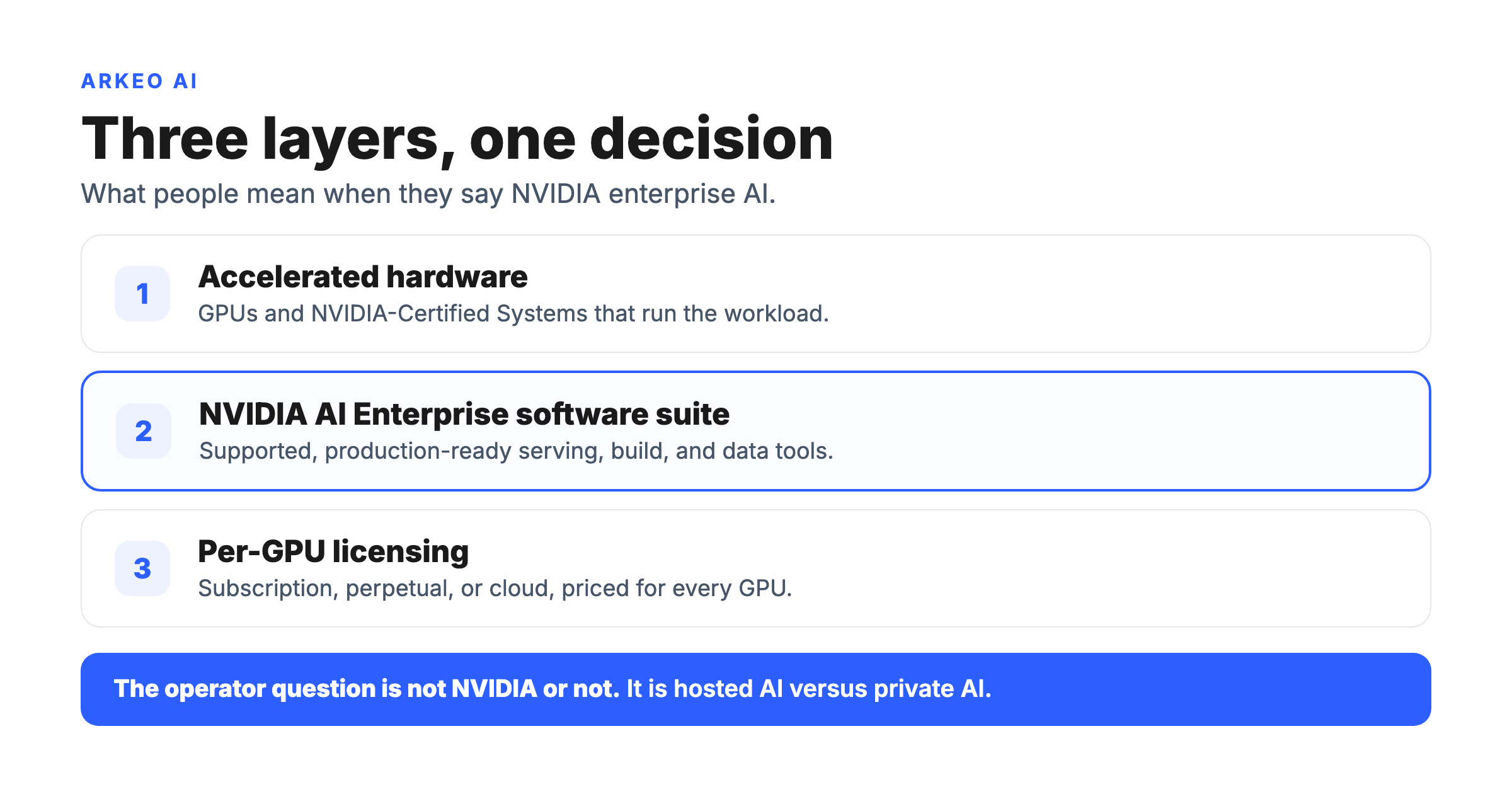
NVIDIA Enterprise AI is not one product. It is a three-layer stack: accelerated hardware (GPUs and certified systems), the NVIDIA AI Enterprise software suite that runs production AI on that hardware, and a per-GPU licensing model that ties the two together. Most of the confusion in the market comes from people using the same three words to mean any one of those three layers. Once you separate them, the buying decision gets a lot simpler.
The marketing layer that most people mean when they say it is the middle one. NVIDIA describes NVIDIA AI Enterprise as a fully supported, production-ready, commercial software suite that combines microservices, frameworks, and libraries with GPU orchestration and infrastructure management. In plainer terms: it is the supported, patched, enterprise-grade version of the open-source AI tooling that data scientists already use, packaged so an IT department can actually run it in production and get a support line when it breaks.
Quick Answer
• What it is: A three-layer stack: NVIDIA accelerated GPUs and certified systems, the NVIDIA AI Enterprise software suite, and per-GPU licensing.
• Cost: Software licensing runs about $4,500 per GPU per year on subscription, $22,500 per GPU perpetual (with five years of support), or $1 per GPU per hour in the cloud. Hardware is separate.
• Timeline: A first quick win in 30 to 90 days; a scoped custom agent in production in 6 to 10 weeks.
• Why it matters: Most mid-market companies should start on hosted AI. NVIDIA enterprise AI earns its cost when data sensitivity, control, latency, or cost-at-scale push you toward private, on-premise AI.
The other reason the term feels slippery is that the suite genuinely is large. It is organized into an application layer (what you build and run AI with) and an infrastructure layer (what manages and orchestrates the GPUs). You do not need to memorize the catalog. You need to know which tool does which job, which is the next section. The full component map lives in the NVIDIA AI Enterprise software suite breakdown.
What is inside the NVIDIA AI Enterprise software suite?
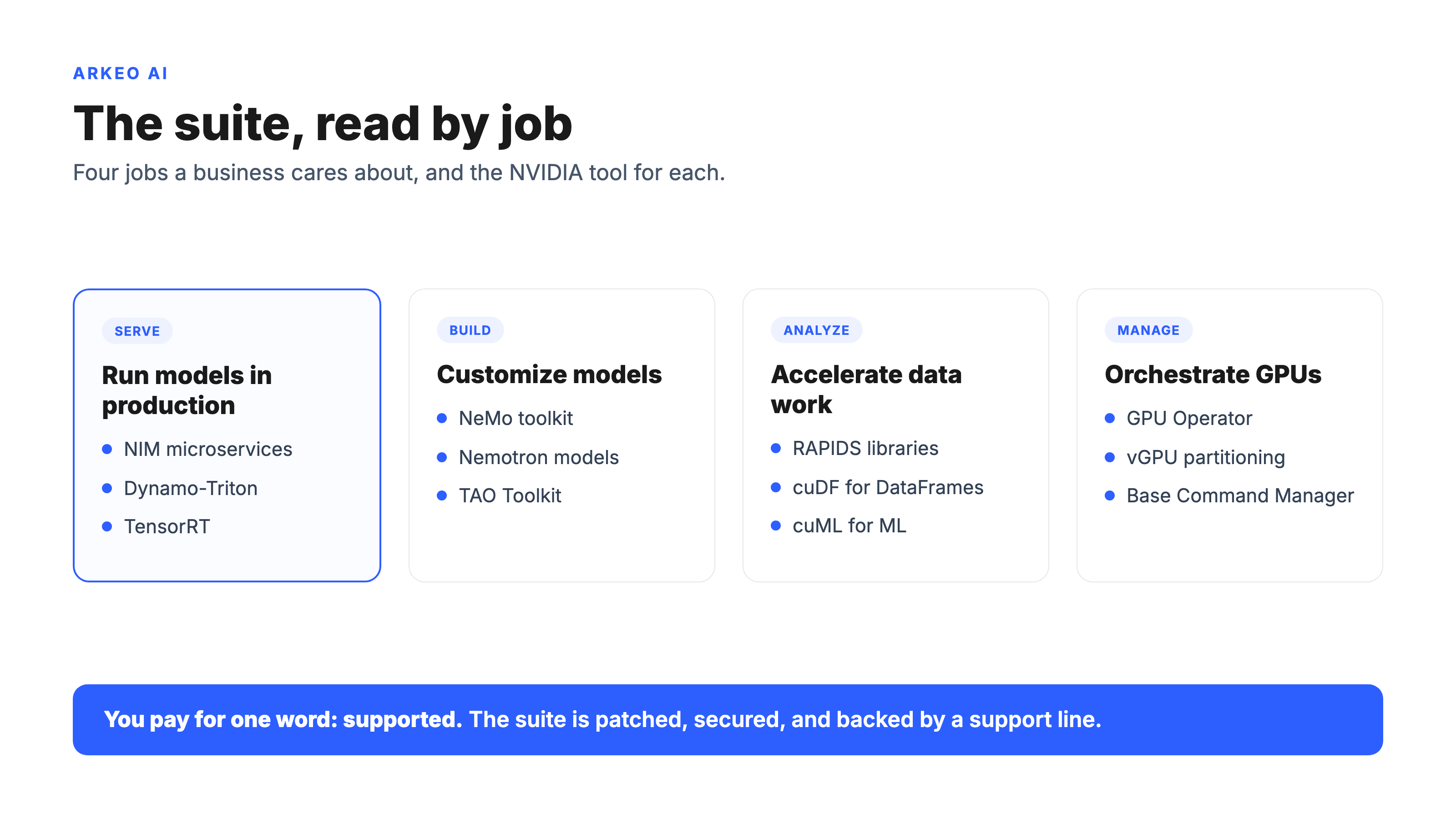
The cleanest way for an operator to read the suite is by job, not by product name. There are three jobs a business actually cares about: serving models in production, building or customizing models, and accelerating data work. NVIDIA has named tools for each.
Serving and inference is where most mid-market value shows up first, because it is the layer that turns a model into something an employee or a customer can use. NVIDIA NIM microservices are prebuilt, optimized inference containers for rapidly deploying current AI models on any NVIDIA-accelerated infrastructure, and they expose industry-standard, OpenAI-compatible APIs so your developers do not have to learn a proprietary interface. Underneath, Dynamo-Triton (formerly Triton Inference Server) runs models across frameworks like PyTorch, ONNX, and TensorRT, and TensorRT itself is the optimization engine that makes inference fast on the hardware.
Building and customizing is the NeMo family: a toolkit for the full agent lifecycle, covering data preparation, fine-tuning, evaluation, guardrails, and observability, with the Nemotron foundation models as NVIDIA's own pretrained starting points. NeMo supports cloud, on-premises, and hybrid deployments, which matters if your reason for looking at NVIDIA at all is keeping data in-house. The TAO Toolkit handles transfer learning and model customization for teams that want to adapt an existing model rather than train from scratch.
Data science and analytics is RAPIDS, a collection of open-source libraries that accelerate the data tools your analysts already use, such as pandas and scikit-learn, with what NVIDIA describes as zero-code-change APIs. The promise is that the GPUs you bought for AI also speed up the data pipeline that feeds it.
Below all of that is the infrastructure layer: GPU drivers, the Container Toolkit, the GPU Operator, Kubernetes operators, vGPU for partitioning a card across workloads, and Base Command Manager. This is the plumbing that lets an IT team treat a rack of GPUs like managed infrastructure instead of a science project. For the mid-market, the value of the suite is almost entirely in the word "supported": you are paying for someone to patch it, secure it, and answer the phone when it fails.
How does NVIDIA AI Enterprise licensing and pricing work?
This is where operators get surprised, so be precise about it. The license is priced per GPU, not per server, per user, or per seat. NVIDIA's licensing model states that a software license is required for every GPU installed on any server or workstation that hosts the suite. Put eight GPUs in a box, and you license eight GPUs.
There are three ways to pay for it, and the published per-GPU pricing is concrete:
| Purchase model | Price (per GPU) | What is included |
|---|---|---|
| Subscription (1 year) | $4,500 / year | Business Standard Support included; multi-year discounts apply. |
| Perpetual license | $22,500 one-time | Indefinite use, includes five years of support services. |
| Cloud (CSP marketplace) | $1 / GPU / hour | Plus the cloud instance cost; available on major clouds. |
Two practical notes. First, there is no current named entry tier such as "Essentials" to chase: the entry path most mid-market buyers actually take is the bundled subscription that ships with the hardware. Each NVIDIA H100 and H200 GPU includes a five-year NVIDIA AI Enterprise subscription, and Hopper-architecture DGX systems include the suite in the system bundle, so the software cost can effectively be folded into the hardware purchase rather than paid separately. Second, development and prototyping are free; the meter only starts at production. That distinction is the whole game for a company that wants to test before it commits, and it is covered in depth in the NVIDIA AI Enterprise subscription guide.
Now stack the layers together and the real number appears. A modest on-premise deployment is rarely the license alone. It is GPUs (often the most expensive line), certified servers, networking, power and cooling, the license per GPU, and the people to run it. The license might be the smallest entry on the invoice. That is the moment most mid-market evaluations should pause and ask a harder question.
Does a mid-market business actually need NVIDIA enterprise AI?
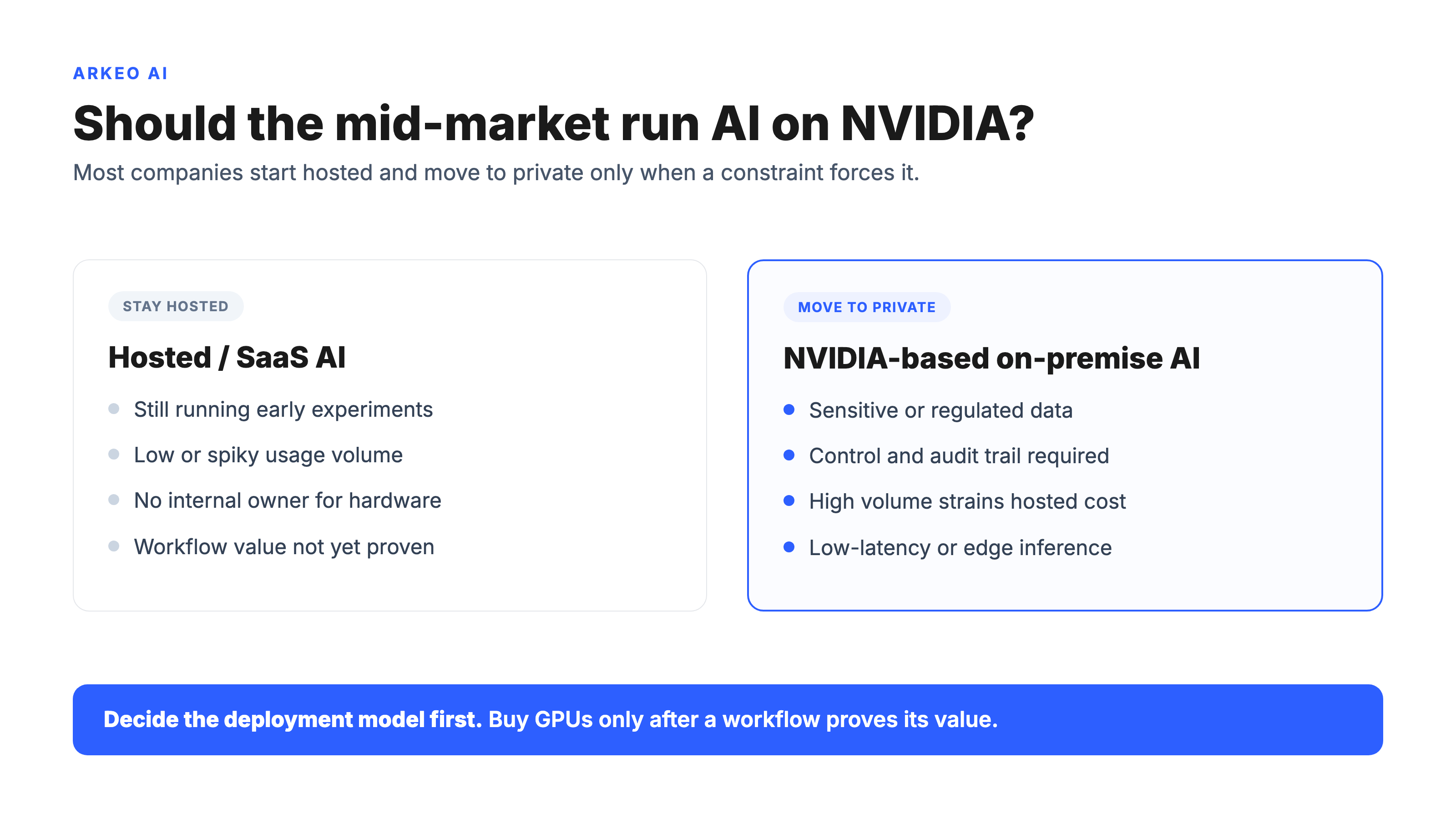
Most businesses think the question is "NVIDIA or not." They are wrong. The real question is "hosted AI or private AI," and NVIDIA enterprise AI is simply what private AI is built on once you decide you need it. For the large majority of 50-to-500-person companies, the honest answer at the start is: not yet.
Here is the blunt truth a hardware seller will not put in a brochure. The first quick win for a mid-market company almost never requires a GPU you own. Off-the-shelf copilots cost roughly $20 to $30 per user per month and go live in days. They cover document drafting, meeting summaries, code assistance, and customer-service triage with zero infrastructure. According to McKinsey's State of AI research, the share of organizations using AI in at least one business function has climbed well past two-thirds, and almost none of that adoption started with owned hardware. The same direction shows up in the independent Stanford HAI 2025 AI Index report, which documents how broadly enterprise AI has moved into routine business use. The pattern across the market is clear: companies that win with AI start with hosted tools and graduate to owned infrastructure only when a specific constraint forces the move.
See where AI fits your operation
The free AI Assessment maps your data, bottlenecks, and the real deployment model for your situation, so you size NVIDIA infrastructure to a workflow instead of a hunch.
Book Your Free AI Assessment →
So when does NVIDIA enterprise AI earn its cost? Four signals, in roughly the order they appear:
| Hosted / SaaS AI | NVIDIA-based private / on-premise AI |
|---|---|
| Control: vendor controls the model and the data path | Control: you own the model deployment and the data path |
| Data: prompts and outputs leave your network | Data: everything stays inside your firewall |
| Cost shape: low fixed cost, scales with usage | Cost shape: high fixed cost, flat at high volume |
| Effort: live in days, almost no IT lift | Effort: weeks of setup, ongoing operations |
Good-fit signals for moving to NVIDIA-based private AI: your data is sensitive or regulated and cannot leave the building; you need control over the model and the audit trail for compliance reasons; your usage volume is high enough that per-token hosted pricing has become a budget line you watch; or latency requirements (real-time inference at the edge or on the factory floor) rule out a round trip to a public cloud.
Poor-fit signals, where owning hardware is premature: you are still running early experiments, your volume is low and spiky, you have no internal owner who can keep GPU infrastructure healthy, or you have not yet proven the workflow delivers value on a hosted tool. Buying a rack to validate an idea is the most expensive way to learn it does not work. The deeper hardware tradeoffs are in the enterprise AI GPU guide.
How should the mid-market evaluate this without overbuying?
Picture a 200-person manufacturer that decided it needed private AI on day one. Leadership greenlit an on-premise build to keep design and quality data in-house, and the project ran the way these projects run when they skip the readiness step. The eight-week production timeline slipped to five months, mostly because the team discovered late that the agent needed read access to an ERP system and a quality database that had never been connected, and unwinding that data-access scope (deciding what the agent could and could not see) took longer than standing up the GPUs. The hardware was never the bottleneck. The unscoped data was. This is a hypothetical, but it is the single most common way a real NVIDIA enterprise AI project goes sideways.
The fix is to sequence the decision instead of buying the hardware first. The approach Arkeo uses with mid-market clients runs in four steps. First, Current State: map where your data actually lives and which bottlenecks cost you the most. Second, 30-to-90-Day Easy Wins: deploy off-the-shelf tools and prompts against those bottlenecks to prove value fast, with no owned hardware. Third, Mid-Term Agent Opportunities: identify the top two or three custom workflow agents worth building. Only then, fourth, Long-Term Architecture: decide whether those agents justify a private, on-premise AI platform, which is the point at which NVIDIA enterprise AI enters the conversation.
Real numbers from this kind of work, so you can budget honestly. A scoped single-workflow custom agent in Arkeo's own builds runs about $15,000 to $40,000 and takes 6 to 10 weeks to reach production. An off-the-shelf copilot, by contrast, costs around $20 to $30 per user per month and is live in days. The first measurable quick win typically lands in 30 to 90 days. If a vendor quotes you a six-figure GPU build before anyone has mapped your data or proven a workflow, that sequence is backwards and the cost reflects it. For the production-side mechanics once you do decide to build, the NVIDIA AI Enterprise deployment guide goes deep.
One honesty note, because it shapes the advice. Arkeo is not an NVIDIA partner, reseller, or certified integrator, and does not earn anything from selling you GPUs. The firm is a vendor-neutral on-premise and private-AI deployment advisor for the mid-market. That neutrality is the entire point: the recommendation you get is the one that fits your operation, not the one that moves the most hardware. Often the right first answer is "stay on hosted AI for another two quarters," and a reseller is structurally unable to tell you that.
Avoid the six-figure mistake
Before anyone quotes you GPUs, the free AI Assessment pressure-tests whether hosted, hybrid, or NVIDIA-based on-premise AI is the right call for your data and volume.
Book Your Free AI Assessment →





